Do you need a mouse with 7+ programmable buttons?
Plenty of mice offer seven or more assignable controls. Whether that is worth paying for depends on one thing, and it is not gaming. Plus why two vendors can count the same mouse differently.
Updated 6 Oct 2026 · no hands-on testing
The short answer
Only if you already know what you would put on them. Extra buttons pay off when there is a specific repeated action you want under your thumb: a push-to-talk key, an in-game ability, a copy-paste, a browser back. If you cannot name two right now, five is plenty, and the money is better spent on the shape or the sensor.
If you can name them, CORSAIR Scimitar RGB Elite is one way there: a twelve-key panel under the thumb. It was seen at $89.99 on 12 Oct 2026; check the current price. For work rather than games, Logitech MX Master 3S for Business is the same idea with seven controls and quiet clicks, and it was seen at $109.99 on 23 Oct 2026; check the current price.
The picks
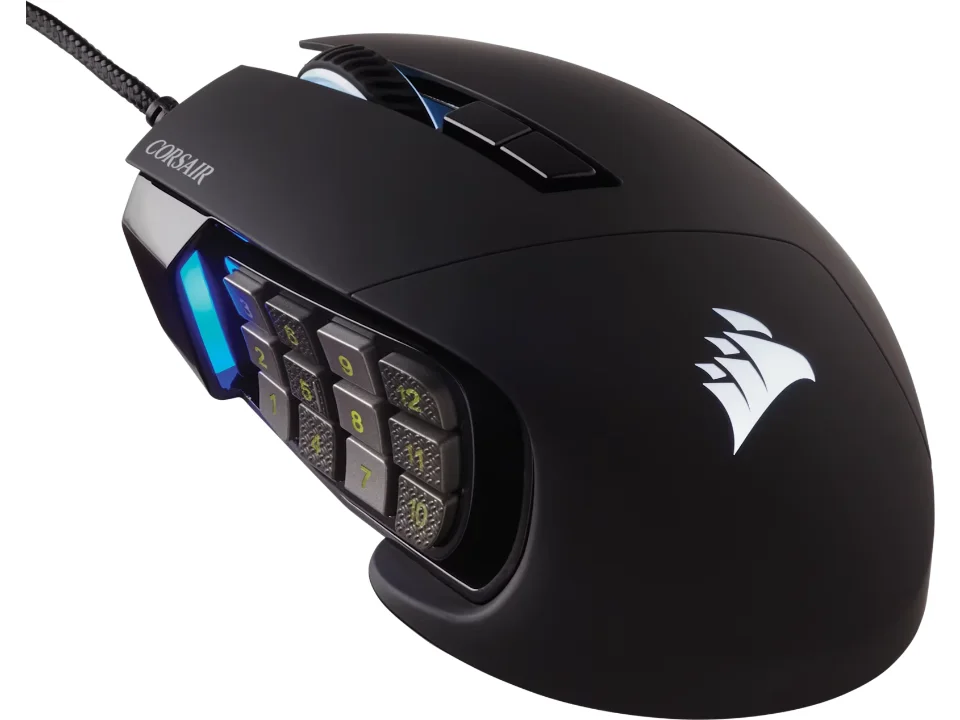
Twelve keys under the thumb
$89.99 seen 12 Oct 2026; check the current price
Seventeen buttons, twelve of them on a sliding side panel, wired. It was seen at $89.99 on 12 Oct 2026; check the current price. Built for games with a lot of abilities to reach.
Check price on AmazonPaid link — QuickDesker may earn a commission.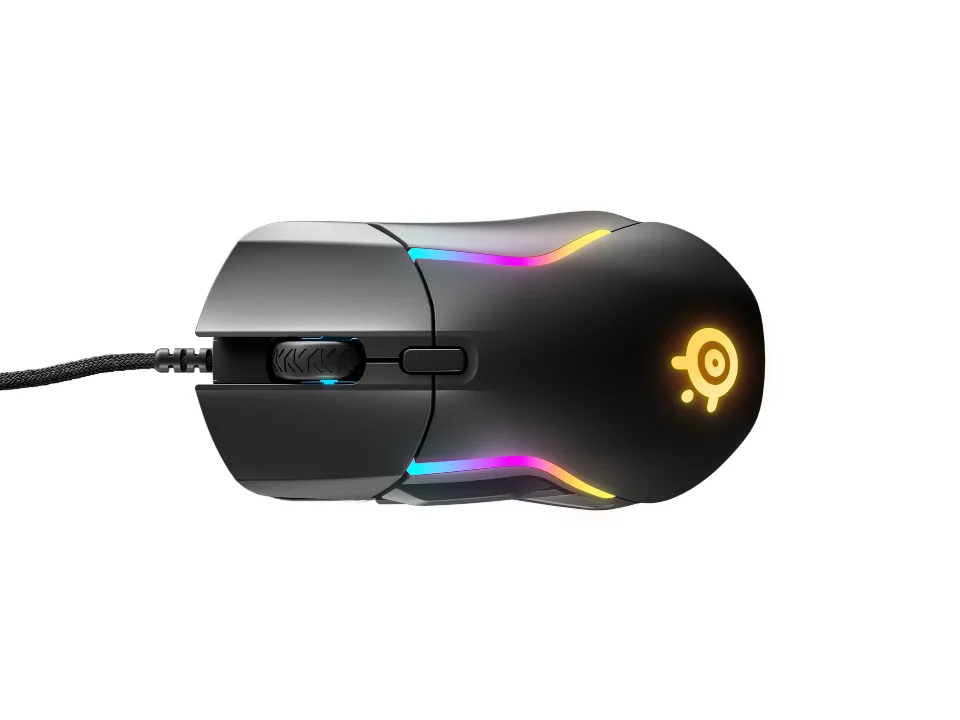
Nine buttons without the panel
$63.99 seen 31 Oct 2026; check the current price
A conventional gaming shell with nine buttons rather than a thumb grid, wired. It was seen at $63.99 on 31 Oct 2026; check the current price. It puts the extra controls where an ordinary mouse already has buttons, so nothing has to be learned by touch before the mouse is useful.
Check price on AmazonPaid link — QuickDesker may earn a commission.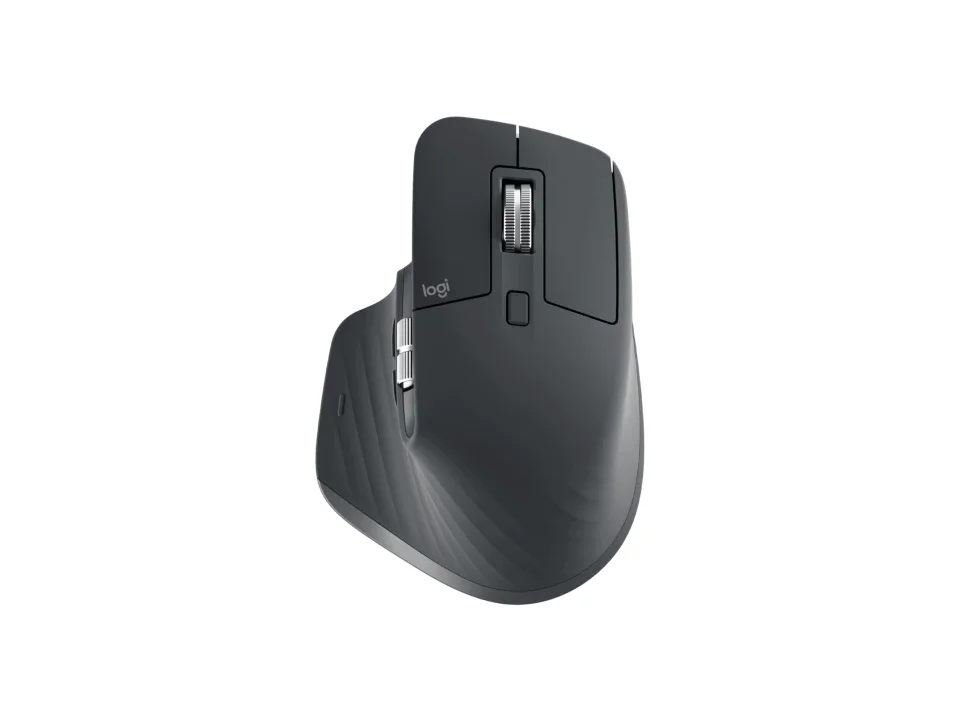
For work rather than games
$109.99 seen 23 Oct 2026; check the current price
Seven programmable controls, a wheel that switches to free-spinning, tilt scrolling and quiet clicks. Configured through Logi Options+, which can apply different button assignments per application: the feature that makes extra buttons useful outside gaming.
Check price on AmazonPaid link — QuickDesker may earn a commission.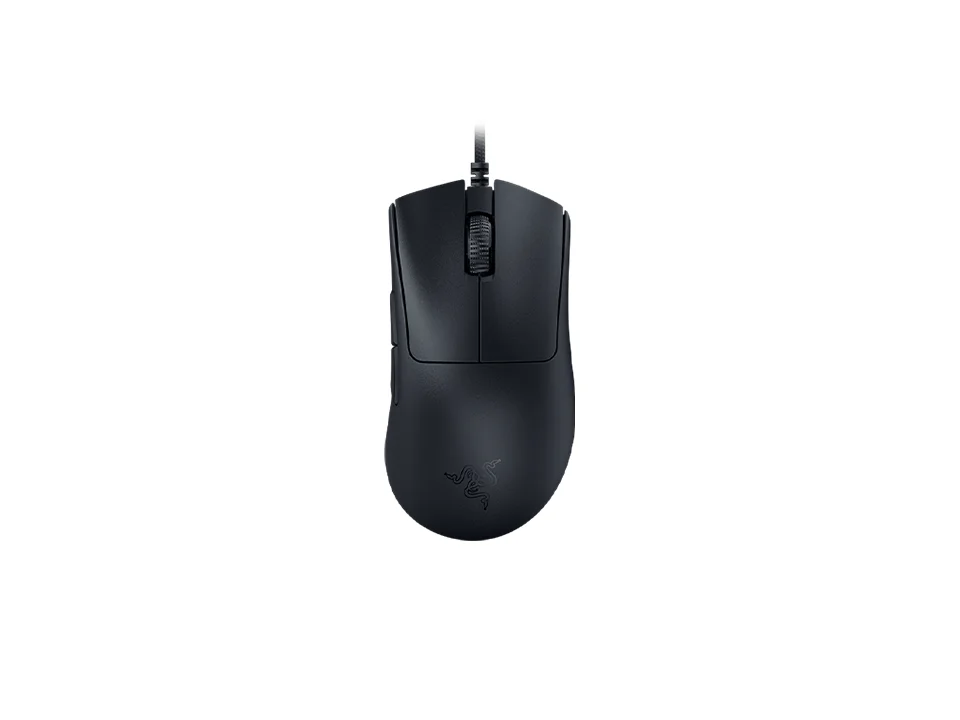
The counting example
$59.99 seen 27 Oct 2026; check the current price
Razer quotes eight programmable controls on a mouse with six physical buttons, because the count includes things like the DPI control. Both numbers are true and they are counting different things: six things you press, eight things you can assign. This site goes with the assignable figure, and the table shows both. It also weighs 59 g and Razer rates its switches for 90 million clicks.
Check price on AmazonPaid link — QuickDesker may earn a commission.
Why do two vendors count the same mouse differently?
Because there is no standard for what counts as a mouse button. Some vendors quote physical buttons. Others quote programmable controls, which can include a DPI-shift key, wheel tilt left and right, or a mode toggle. What a DPI-shift key is actually for is covered in DPI vs polling rate: which mouse number actually matters?
Razer DeathAdder V3 is the clean example: six physical buttons, eight programmable controls. Logitech G G502 X quotes eleven and thirteen. So does Logitech G G502 X LIGHTSPEED. Razer Naga V2 HyperSpeed quotes nineteen and twenty-one.
We record both figures where a vendor publishes both, and our seven-or-more filter uses the larger, assignable one: because what you are buying is things you can assign, not lumps of plastic. That rule is applied the same way everywhere, and the table below shows both numbers side by side so you can apply a different one if you disagree.
When do extra buttons actually pay off?
When you can name the action before you buy the mouse. It is not really about quantity: it is about whether something you repeat many times a day can move from a keyboard shortcut, which needs your other hand, to your thumb, which is already there.
For games that means abilities: a twelve-key thumb panel like the one on CORSAIR Scimitar RGB Elite or Razer Naga V2 HyperSpeed exists because some games have more abilities than a keyboard hand can comfortably reach.
For work it means whatever you do constantly (switching desktops, muting a call, moving between browser tabs). This is where per-application profiles matter more than the button count: Logitech MX Master 3S for Business with seven controls that change meaning depending on the app in front of you is more useful than a dozen fixed ones. Razer Pro Click V2 lists 9 programmable controls, and Razer says customization is available for Microsoft apps such as Word and Excel and for Adobe's suite.
What do extra buttons cost you?
Extra controls can cost more and can get in the way if their placement does not suit your grip. Unassigned buttons can still be pressed accidentally, and a thumb panel in particular changes how the mouse is held, which is a real change to your grip rather than a free addition. What that change actually involves is covered in Palm, claw or fingertip: which mouse grip do you use, and does it matter?
The button count also correlates with weight and price, and both of those are things people optimise in the other direction. The lightest mice on this page publish weights in the fifties of grams: HyperX Pulsefire Haste 2 at 53 g has six buttons, and the lightest here with seven or more controls, Razer Viper V3 Pro at 54 g, deliberately quotes eight rather than twenty.
And most mice have six buttons or fewer, the inexpensive ones especially. That is not the cheap end being under-equipped; it is what most people need.
Which specification should you actually check?
Onboard memory, which almost nobody looks at. A button assignment has to live somewhere. On a mouse with no onboard storage it lives in the vendor's software, which then has to be installed and running on every machine you use it on. On a mouse that stores profiles itself, the assignment travels with the hardware and works on a computer you cannot install anything on.
Only a few vendors publish a figure for this. Razer DeathAdder V3 and Razer Basilisk V3 both quote five onboard profiles; most products quote nothing at all, and the table says "Not recorded" rather than guessing.
If you use more than one computer, or a work machine you do not control, this matters considerably more than whether the mouse has nine buttons or eleven.
The Logitech G305 LIGHTSPEED is the kind of answer to look for: all six of its buttons can be remapped in Logitech G HUB, and Logitech lists one onboard profile, so your setup goes with the mouse.
Which mice offer extra assignable controls?
| Product | Physical buttons | Assignable controls | Configured with | Onboard profiles | Connection | Price when seen | Where to buy |
|---|---|---|---|---|---|---|---|
| CORSAIR Scimitar RGB Elite | 17 | 17 | CORSAIR iCUE | 3 | Wired | $89.99 (seen 12 Oct 2026) | Check price on AmazonPaid link |
| Razer DeathAdder V3 | Not recorded | 8 | Razer Synapse 3 | 5 | Wired | $59.99 (seen 27 Oct 2026) | Check price on AmazonPaid link |
| Razer Basilisk V3 | 11 | 11 | Razer Synapse 3 | 5 | Wired | $49.99 (seen 26 Oct 2026) | Check price on AmazonPaid link |
| SteelSeries Rival 5 | 9 | 9 | SteelSeries Engine | Not recorded | Wired | $63.99 (seen 31 Oct 2026) | Check price on AmazonPaid link |
| ELECOM EX-G PRO Trackball (M-XPT1MRXBK) | 8 | Not recorded | ELECOM Mouse Assistant | Not recorded | Wireless | $74.99 (seen 12 Oct 2026) | Check price on AmazonPaid link |
| Logitech MX Master 3S for Business | 7 | Not recorded | Not recorded | Not recorded | Wireless | $109.99 (seen 23 Oct 2026) | Check price on AmazonPaid link |
| Logitech G G502 X | 11 | 13 | Logitech G HUB | 5 | Wired | $79.99 (seen 21 Oct 2026) | Check price on AmazonPaid link |
| Razer Naga V2 HyperSpeed | 19 | 21 | Razer Synapse 3 | 1 | Wireless | $79.99 (seen 27 Oct 2026) | Check price on AmazonPaid link |
| Logitech MX Master 4 | 8 | Not recorded | Logi Options+ | Not recorded | Wireless | $119.99 (seen 8 Sep 2026) | Check price on AmazonPaid link |
| CORSAIR Scimitar Elite Wireless SE | 16 | 16 | CORSAIR iCUE | 3 | Wireless | $59.99 (seen 12 Oct 2026) | Check price on AmazonPaid link |
Both counts are shown because vendors disagree about which one to publish. Where a row shows one number and "Not recorded," that vendor published only one figure; we have not derived the other from a photograph or a marketing bullet.
Prices are what we saw on the dates shown, not live figures. A lot of them were promotional when we read them, so check the current price before you buy.
Paid link — QuickDesker may earn a commission.
“Not recorded” means this comparison has no sourced value for that specification. It does not mean the product lacks the feature.
Common questions
- What counts as a programmable button?
Whatever the vendor says can be assigned a function. That includes DPI-shift keys and wheel tilt on the vendors that count them, which is why the same mouse can be an eight-button or a six-button mouse depending on whose page you read.
This site goes with the larger, assignable figure, and shows both numbers in the table so you can apply your own rule instead.
- Do I need special software for the extra buttons?
Usually yes, at least to set them up: Razer Synapse, Logi Options+, CORSAIR iCUE, SteelSeries GG or Logitech G HUB depending on the brand. The column in the table above says which.
Whether the software has to keep running afterwards depends on onboard memory. A mouse with onboard profiles keeps its assignments when you plug it into a machine with nothing installed; a mouse without them does not.
- Are extra buttons only for gaming?
No, and the productivity case is arguably stronger, because software that switches assignments per application turns a fixed set of buttons into a different set in every program. Logitech MX Master 3S for Business and Logitech MX Master 4 are built around that idea rather than around games.
Trackballs get in on it too: ELECOM EX-G PRO Trackball (M-XPT1MRXBK) has eight assignable controls on a device that never moves.
- Is a twelve-button thumb panel comfortable?
We do not know. Nobody here has held one, and it is exactly the kind of question where a confident answer from a site that has not touched the product would be worthless.
What we can tell you is that it is a substantial change to the shape (CORSAIR builds the panel to slide so you can position it), and that if you are unsure, a nine-button mouse without a grid is the lower-risk version of the same idea.
- How many buttons does a normal mouse have?
Five is the common answer: left, right, wheel click and two thumb buttons. Most mice sit at six or fewer, and that band covers the inexpensive end almost entirely.
Three-button mice (no thumb buttons at all) still exist at the bottom of the range, and that is the most common thing people wish they had spent slightly more to avoid.
What this is based on
We have not tested these products. The comparisons use manufacturer specifications and retailer information, with sources linked below. Prices are dated snapshots and may have changed.
Button counts, assignable-control counts, onboard profile figures, weights and sensor specifications are all the manufacturer's own published numbers, from the product or specification pages cited below with the date each was read. Where a vendor publishes only one of the two button figures, only one appears.
None of these mice has been used by anyone on this project. There is nothing here about how a thumb panel feels, how far the buttons travel, or whether a particular layout causes mispresses, because those are things you learn by holding a product, and none of these has been held here.
Seven or more assignable controls is the comparison group used here, not an industry definition. Check whether a vendor counts physical buttons, wheel directions or software functions before comparing totals.
Sources (38)
- Best Buy: CORSAIR - Scimitar RGB Elite Wired MOBA/MMO Optical Gaming Mouse with 17 Programmable Buttons - Wired - Black (Retailer, read 4 Oct 2026)
- Best Buy: Logitech - MX Master 4 Ergonomic Wireless Mouse - Black (Retailer, read 8 Sep 2026)
- Best Buy: Logitech G305 LIGHTSPEED Wireless Optical 6 Programmable Button Gaming Mouse with 12,000 DPI HERO Sensor - Black (Retailer, read 3 Oct 2026)
- Best Buy: Logitech G502 X LIGHTSPEED Wireless Optical Gaming Mouse, Black (Retailer, read 4 Oct 2026)
- Best Buy: Logitech G502 X Wired Optical Gaming Mouse, White (Retailer, read 4 Oct 2026)
- Best Buy: Logitech MX MASTER 3S Bluetooth Edition for Business Performance Wireless Mouse Wireless Graphite (Retailer, read 4 Oct 2026)
- Best Buy: Razer - Basilisk V3 Optical Gaming Mouse with Chroma RBG Lighting - Wired - White (Retailer, read 4 Oct 2026)
- Best Buy: Razer - DeathAdder V3 Lightweight Optical Gaming Mouse with 8K Hz HyperPolling Technology - Wired - Black (Retailer, read 4 Oct 2026)
- Best Buy: Razer - Naga V2 HyperSpeed MMO Optical Gaming Mouse with 19 Programmable Buttons - Wireless - Black (Retailer, read 4 Oct 2026)
- Best Buy: Razer Viper V3 Pro (Black) (Retailer, read 4 Oct 2026)
- Best Buy: SteelSeries - Rival 5 Wired Optical Gaming Mouse with RGB Lighting - Wired - Black (Retailer, read 4 Oct 2026)
- Corsair: Product information: Scimitar RGB Elite (Manufacturer, read 26 Sep 2026)
- Corsair: SCIMITAR ELITE WIRELESS SE MMO Gaming Mouse – Black & Yellow on Corsair.com (Manufacturer, read 26 Sep 2026)
- Corsair: SCIMITAR ELITE WIRELESS SE MMO Gaming Mouse – Gun Metal (Manufacturer, read 26 Sep 2026)
- Corsair: SCIMITAR RGB ELITE Optical MOBA/MMO Gaming Mouse (Manufacturer, read 26 Sep 2026)
- ELECOM: Trackball "EX-G PRO" (thumb-operated type) - M-XPT1MRXBK (Manufacturer, read 6 Sep 2026)
- ELECOM USA: EX-G PRO Trackball (Manufacturer, read 6 Sep 2026)
- HyperX: HyperX Pulsefire Haste 2 | Gaming Mouse (Manufacturer, read 7 Sep 2026)
- Logitech: G305 LIGHTSPEED Wireless Gaming Mouse Technical Specifications (Manufacturer, read 7 Sep 2026)
- Logitech: Logitech G305 Lightspeed Wireless Gaming Mouse (Manufacturer, read 7 Sep 2026)
- Logitech: MX Master 3S Business Wireless Mouse (Manufacturer, read 26 Sep 2026)
- Logitech: MX Master 3S for Business Datasheet (Manufacturer, read 26 Sep 2026)
- Logitech: MX Master 4 Wireless Mouse (Manufacturer, read 8 Sep 2026)
- Logitech: Specification - G502 X Gaming Mouse (Manufacturer, read 7 Sep 2026)
- Logitech: Specification - G502 X LIGHTSPEED Gaming Mouse (Manufacturer, read 7 Sep 2026)
- Logitech: Specification - MX Master 3S (Manufacturer, read 26 Sep 2026)
- Logitech: Specification - MX Master 4 (Manufacturer, read 8 Sep 2026)
- Logitech: Specifications - MX Master 3s for Business (Manufacturer, read 26 Sep 2026)
- Logitech G: G502 X Gaming Mouse (Manufacturer, read 7 Sep 2026)
- Logitech G: G502 X LIGHTSPEED Wireless Gaming Mouse (Manufacturer, read 7 Sep 2026)
- Razer: Razer Basilisk V3 product page (Manufacturer, read 8 Sep 2026)
- Razer: Razer Basilisk V3 specs page (Manufacturer, read 8 Sep 2026)
- Razer: Razer DeathAdder V3 product page (Manufacturer, read 24 Sep 2026)
- Razer: Razer Naga V2 HyperSpeed product page (Manufacturer, read 26 Sep 2026)
- Razer: Razer Pro Click V2 - Wireless Ergonomic Mouse (Manufacturer, read 9 Sep 2026)
- Razer: Razer Viper V3 Pro master guide (Manufacturer, read 26 Sep 2026)
- Razer: Razer Viper V3 Pro product page (Manufacturer, read 26 Sep 2026)
- SteelSeries: Rival 5 (Manufacturer, read 9 Sep 2026)
Related guides
Build your setup
Compare keyboards, mice and headphones in the setup builder, then save the combination you like. Prefer a list? Browse all products.