Palm, claw or fingertip: which mouse grip do you use, and does it matter?
Learn how palm, claw and fingertip grips differ, how to measure your hand, and which mouse dimensions to check before buying.
Updated 9 Oct 2026 · no hands-on testing
The short answer
There are three ways people hold a mouse and you already use one of them. Palm means your whole hand rests on the shell and the movement comes from your forearm. Claw means the heel of your hand is down but your fingers are curled up onto the buttons, which CORSAIR describes as fingertips curling over to reach the buttons and grip the sides. Fingertip means only your fingertips touch it and your palm floats clear.
It matters because it changes what size and weight of mouse fits you, not because one grip is correct. A palm grip wants length and a raised back to rest against; a fingertip grip wants something short and light enough to steer with three fingers. The frustrating part is that the number which would settle this, the physical length of the mouse, is not something we hold for any of these, so the last step has to happen on the manufacturer's page rather than here.
The picks
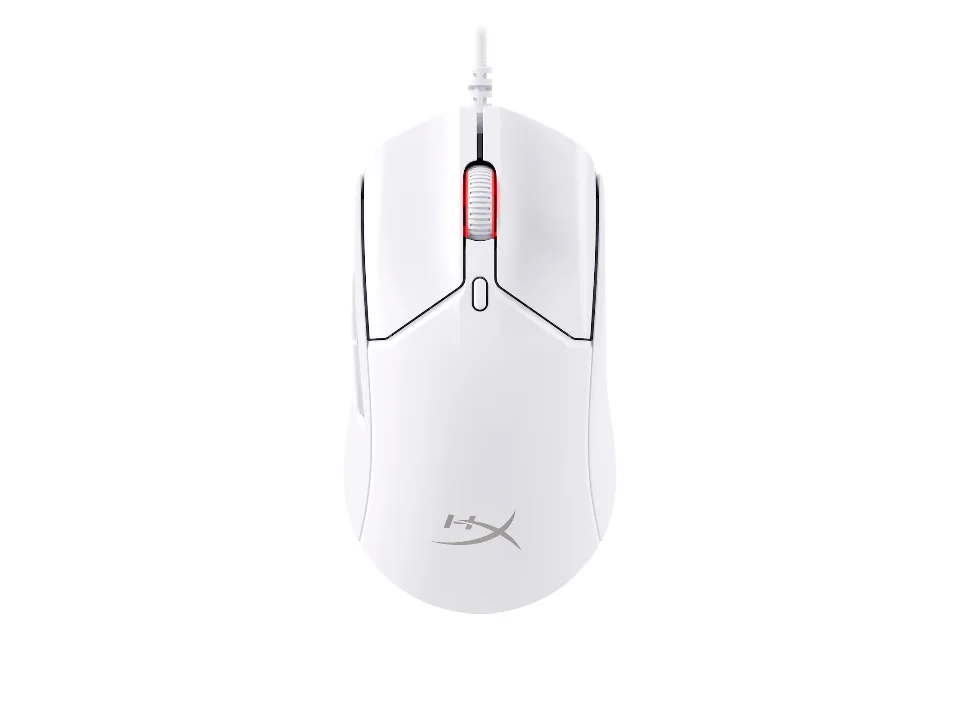
The lightest mouse here, and what that is for
$39.99 seen 14 Oct 2026; check the current price
Published at 53 g, which is the lowest stated weight on this page, in an ambidextrous shell. It was seen at $39.99 on 14 Oct 2026; check the current price. Both Logitech and CORSAIR point fingertip and claw grips at light, compact mice for the same reason: if your palm is not resting on it, the mouse is being carried by your fingers and every gram is a gram they hold.
Check price on AmazonPaid link — QuickDesker may earn a commission.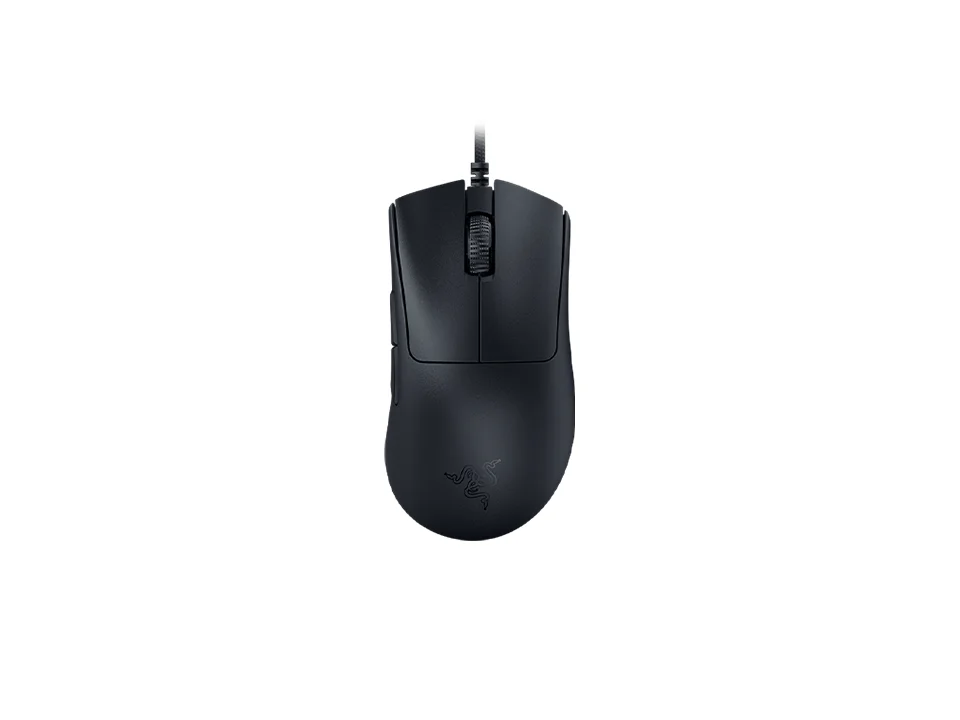
Contoured for a right hand, and still under 60 g
$59.99 seen 27 Oct 2026; check the current price
Published at 59 g in a shape moulded for a right hand rather than a symmetrical one. It was seen at $59.99 on 27 Oct 2026; check the current price. Worth naming because it breaks the assumption that an ergonomic shell has to be a heavy one, and because it means a claw grip does not force you into an ambidextrous shape to get a light mouse.
Check price on AmazonPaid link — QuickDesker may earn a commission.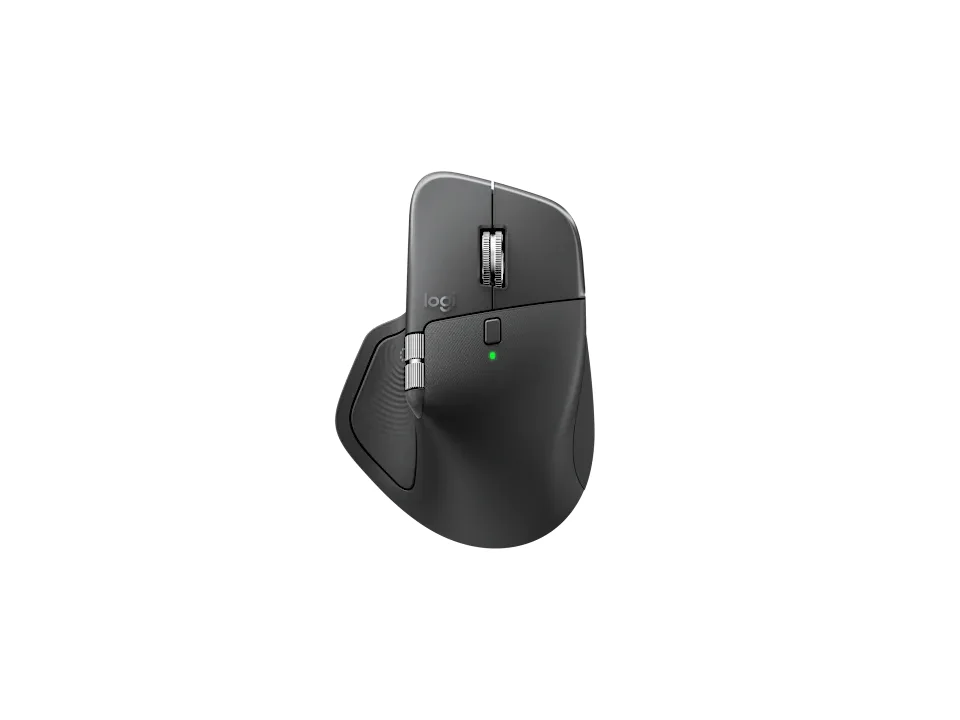
The other end: built to be leaned on
$119.99 seen 8 Sep 2026; check the current price
Published at 150 g, which is nearly three times the lightest mouse above, with a tall contoured back. It was seen at $119.99 on 8 Sep 2026; check the current price. This is what a mouse designed entirely around a palm grip looks like, and the weight is the point rather than an oversight: nothing is lifting it, so it is built to sit still under a resting hand.
Check price on AmazonPaid link — QuickDesker may earn a commission.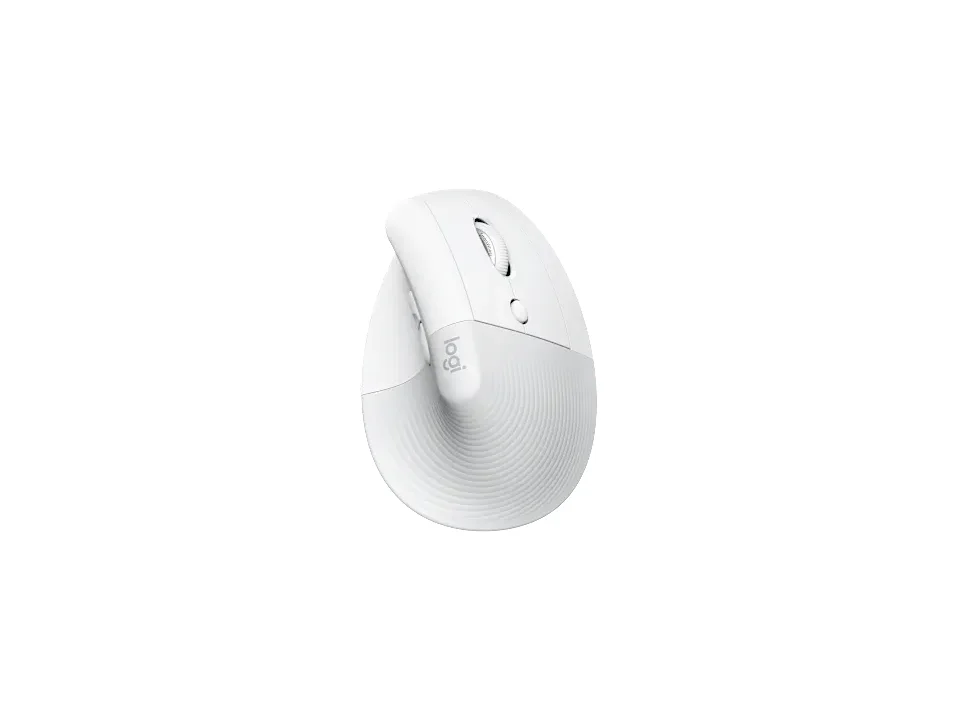
Where the grip question stops applying
$69.99 seen 22 Oct 2026; check the current price
A vertical mouse published at 124 g, sold in separate left-hand and right-hand versions. It was seen at $69.99 on 22 Oct 2026; check the current price. A vertical shell rotates your forearm into a handshake position, and once it does, palm and claw and fingertip stop describing anything useful. If this is the direction you are heading, the shape comparison is in Vertical mouse vs. trackball: which ergonomic mouse is right for you?
Check price on AmazonPaid link — QuickDesker may earn a commission.
What are the three mouse grips?
Palm grip is the whole hand down. CORSAIR describes it as your palm and fingers resting on the mouse with movement originating from the forearm and elbow, and that last part is the giveaway: a palm grip moves the mouse by moving your arm, because your wrist is more or less parked. CORSAIR calls this the grip with the most contact and the most accuracy, on the grounds that movements from the arm and elbow are more precise than movements from the fingers.
Claw grip lands in between. The heel of your hand rests on the shell while your fingertips curl over to reach the buttons and grip the sides, which is CORSAIR's wording, and Logitech G describes the same thing as the fingers on the mouse buttons being curled to resemble a claw. On both accounts it keeps the anchor of a hand that is resting on the shell while leaving the fingers tensioned over the buttons.
Fingertip grip lifts the palm off entirely and steers with the tips of the fingers only. CORSAIR puts the trade directly: it says the grip allows smaller, quicker adjustments, and that it sacrifices some precision because movements made with just the fingers are quick but not as precise. Both halves of that are CORSAIR's own characterisation of its own category.
None of this is a technique to learn. It is a description of what your hand already does, arrived at by your hand size, your desk height and whatever mouse you happened to buy first. The reason to know which one you are is that it predicts what will fit you next.
How can you tell which grip you use?
Look down at the mouse you are using now and answer two questions. Is the heel of your hand touching the mouse, and are your index and middle fingers lying flat along the buttons or curled up over them? Flat fingers with the heel down is a palm grip. Curled fingers with the heel down is a claw. Heel in the air is fingertip.
Plenty of people switch without noticing. A palm grip for reading and a claw when something needs doing quickly is completely normal, and if you find yourself between two descriptions, you are between them. Buy for the one you spend the most hours in.
Which one suits you better is not a question this page can answer. No one here has held any of these mice, and a grip preference is settled by your own hand on your own desk in about thirty seconds. This page can tell you what the categories mean and what each implies about size and weight. It cannot sit in for the thirty seconds.
Does your grip change which mouse you should buy?
It changes the size and the weight, and both manufacturers say so in almost the same terms. CORSAIR points fingertip grips at shorter, lower-profile mice and gives 117 mm as an example of a length that suits one, points claw grips at a shell with a higher rear hump to support the heel of the hand, and says a palm grip needs a shape supporting the full hand. Logitech G arrives at the same place from its own product line: larger mice with higher backs for palm, a medium mouse with a hump toward the middle-rear for claw, and compact ultralight mice for fingertip.
The logic underneath is simple enough to check against your own hand. A palm grip has your hand resting on the mouse, so the mouse has to be long enough to rest on and tall enough at the back to meet your palm where it falls. A fingertip grip has your fingers carrying the mouse, so length is wasted material and every gram is weight your fingers hold up. Claw sits in the middle and cares most about the height of the back, because that is the only part touching your hand.
That is genuinely useful, and it is also where the advice runs out of road. Both companies are describing lengths and heights, and most product pages do not give you those numbers in a form you can compare.
Reviewers found the Logitech G305 LIGHTSPEED small enough to push you into a claw grip, and its curved sides awkward if you lift the mouse often, so on a mouse like that, check the fit before the price.
How do you measure your hand for a mouse?
Logitech publishes a method and it takes ten seconds: measure from the little crease below your palm to the tip of your middle finger. That figure is your hand length, and it is the number to carry to a product page.
What we did not find, and it is the thing to know before you go looking, is a set of numeric bands from Logitech. There is no small, medium and large threshold in centimetres on its own page. What it gives instead is a fit checklist, which is arguably more useful: your fingers should comfortably reach the buttons and the scroll wheel, your thumb should reach the side buttons without stretching, your little finger should not be straining to hold the mouse up, and your palm should have something to rest on if you are resting it.
Read that checklist as four separate failures rather than one score. A mouse can be the right length and still be wrong because the side buttons are set too far forward for your thumb, and that is a fault you find in the first hour and then live with for years.
Logitech says the Logitech MX Vertical is ideally sculpted for medium to large-sized hands. Kensington says the Kensington Pro Fit Ergo Vertical (K75501WW) is designed to fit users with average to larger sized hands.
If you use your left hand, check both the shell and the side-button placement. For left-handed variants and symmetrical designs, read Ambidextrous vs. contoured-right mice: which hand is yours shaped for?
Which mouse dimensions actually matter for your hand?
Check the mouse’s length, width and height against the way you hold it. Manufacturers publish dimensions for models whose measurements are missing from this comparison. Use the exact model’s product page or manual, then consider the shape rather than weight alone.
Look for dimensions in the product specifications or manual, using the exact model name.
So the practical sequence is: measure your hand, decide which grip you spend your day in, narrow to a shape here, and then check the length on the vendor's page before you buy. Dimensions help narrow the choice; they do not guarantee that the shape will suit your hand.
How much does mouse weight matter?
More than the DPI figure and less than the shape. Plenty of mice publish a weight and the range is enormous: from 53 g at the lightest to 261 g for a large trackball, or 53 g to 150 g once you set the trackballs aside. That is a threefold spread among ordinary mice, which is a bigger real difference than almost any other spec on the page.
CORSAIR's framing is that lighter mice favour rapid movement and heavier ones give a more grounded feel, which matches the grip logic: fingers carrying a mouse want less to carry, and a palm resting on one wants it to stay put. The interesting wrinkle is that CORSAIR does not treat heavy as the palm-grip default, and at one point recommends a 36 g mouse to a palm-grip user who wants quick, comfortable movement. So weight tracks what you are doing more than how you hold it.
The published figures back that up in a way that should stop anyone using shape as a proxy for weight. Razer DeathAdder V3 is a contoured right-handed shell at 59 g and Logitech MX Master 4 is a contoured right-handed shell at 150 g. Identical shape category, nearly three times the mass. Neither is wrong, and reading the published figure is the only way to know which one you are ordering.
Where we did not find a weight we leave the row blank rather than estimating from a photograph. If weight matters to you, buy from the group that tells you.
What about vertical mice and trackballs?
They opt out of the question. A vertical mouse rotates your forearm into a handshake position and a trackball stops the mouse moving altogether, so in both cases the relationship between your hand and the device is different in kind rather than in degree. Palm, claw and fingertip stop being useful descriptions.
That is why this site treats them as their own category rather than as another grip. The comparison between vertical mice and trackballs, along with an honest account of what can and cannot be said here about comfort, is in Vertical mouse vs. trackball: which ergonomic mouse is right for you?
If you are reading this because your wrist hurts, go there rather than optimising a grip. And if you would rather look at actual mice next to the keyboards and headphones instead of reading about categories, the setup builder puts all three columns side by side.
How much do these mice weigh?
| Product | Weight (g) | Shape | Shaped for | Buttons | Price when seen | Where to buy |
|---|---|---|---|---|---|---|
| HyperX Pulsefire Haste 2 | Not recorded | Not recorded | Not recorded | 6 | $39.99 (seen 14 Oct 2026) | Check price on AmazonPaid link |
| Razer Viper V3 Pro | 54 | Not recorded | Right-handed | Not recorded | $129.99 (seen 28 Oct 2026) | Check price on AmazonPaid link |
| Razer DeathAdder V3 | 59 | Contoured, right-handed | Right-handed | Not recorded | $59.99 (seen 27 Oct 2026) | Check price on AmazonPaid link |
| Logitech Pebble Mouse 2 M350s | 76 | Not recorded | Not recorded | 3 | $24.99 (seen 24 Oct 2026) | Check price on AmazonPaid link |
| Logitech G G502 X | 89 | Not recorded | Not recorded | 11 | $79.99 (seen 21 Oct 2026) | Check price on AmazonPaid link |
| Logitech Signature M650 | 101.4 | Not recorded | Not recorded | 5 | $33.99 (seen 24 Oct 2026) | Check price on AmazonPaid link |
| Logitech Lift Vertical Ergonomic Mouse | Not recorded | Vertical | Sold in left and right versions | Not recorded | $69.99 (seen 22 Oct 2026) | Check price on AmazonPaid link |
| Logitech MX Master 4 | 150 | Not recorded | Not recorded | 8 | $119.99 (seen 8 Sep 2026) | Check price on AmazonPaid link |
| ELECOM HUGE Trackball (M-HT1URBK) | Not recorded | Trackball | Not recorded | 8 | $49.99 (seen 12 Oct 2026) | Check price on AmazonPaid link |
Every mouse here publishes its weight, which plenty of mice do not. Read the weight and shape columns together: rows three and eight are the same shape category at nearly three times the mass, so the shape name tells you nothing about how heavy a mouse is. We did not find a length for any mouse here, which is the number this topic would most like to have.
Prices are what we saw on the dates shown, not live figures. A lot of them were promotional when we read them, so check the current price before you buy.
Paid link — QuickDesker may earn a commission.
“Not recorded” means this comparison has no sourced value for that specification. It does not mean the product lacks the feature.
Common questions
- What is a claw grip?
Holding a mouse with the heel of your hand resting on the shell while your fingers curl up over the buttons. CORSAIR describes it as the heel of the hand resting on the shell with the fingertips curling over to reach the buttons and grip the sides, and Logitech G describes the fingers on the buttons being curled to resemble a claw.
It sits between the other two: more stable than a fingertip grip because your hand is anchored, and quicker on the buttons than a palm grip because your fingers are already tensioned. CORSAIR notes the cost as finger discomfort over a long session.
- How do I know which mouse grip I use?
Look at your hand on the mouse you are using now. If the heel of your hand is touching the mouse and your fingers lie flat along the buttons, that is a palm grip. If the heel is down but your fingers are curled up over the buttons, that is claw. If your palm is off the mouse entirely and only your fingertips are on it, that is fingertip.
Switching between two of them during a day is normal and not a problem. Buy for whichever one you spend the most hours in.
- Does grip style actually change which mouse I should buy?
It changes the size and weight rather than the brand. CORSAIR points fingertip grips at shorter, lower mice, claw grips at a shell with a higher rear hump to support the heel, and palm grips at a shape that supports the whole hand. Logitech G gives the same guidance from its own range: large with a high back for palm, medium with a hump toward the middle-rear for claw, compact and ultralight for fingertip.
It does not decide symmetry, buttons or sensor. Those are separate questions, and the shell-symmetry one is covered in Ambidextrous vs. contoured-right mice: which hand is yours shaped for?
- How do I measure my hand for a mouse?
Logitech's method is to measure from the little crease below your palm to the tip of your middle finger. That gives you a hand length to compare against a mouse's length on the manufacturer's product page.
We did not find numeric small, medium and large bands from Logitech, so do not expect a threshold to match yourself against. What it publishes instead is a fit test: fingers reaching the buttons and wheel comfortably, thumb reaching the side buttons, little finger not straining, and the palm supported if you rest it.
- Is a lighter mouse better?
Only for some grips and some uses. CORSAIR's framing is that lighter mice favour rapid movement while heavier ones feel more grounded, and it is happy to recommend a very light mouse to a palm-grip user who wants quick movement, so weight follows what you are doing rather than how you hold the thing.
The published spread is wide: 53 g to 150 g among ordinary mice, and up to 261 g for a large trackball. Shape is no guide to it, since Razer DeathAdder V3 and Logitech MX Master 4 are the same shape category nearly three times apart.
- Where do you find a mouse's length?
On the manufacturer's own product page, which is the only place it reliably appears. No product page on this site lists one, because we did not find a length, a width or a height for these mice in a form we could read: we hold a weight, and an angle for the vertical mice, and nothing else geometric.
That is worth saying because length is the spec this particular question wants most. Measure your hand, narrow the shape here, then check the dimensions section on the manufacturer's own product page before ordering.
What this is based on
We have not tested these products. The comparisons use manufacturer specifications and retailer information, with sources linked below. Prices are dated snapshots and may have changed.
The grip descriptions come from two manufacturers' own published explainers read on 2026-08-26, CORSAIR's grip-styles page and Logitech G's mouse shapes and grips page, which agree independently on how each of the three grips is held and on the size and weight each suits. CORSAIR supplies the strengths and weaknesses assigned to each grip and the 117 mm example of a fingertip-suitable length; Logitech G supplies its own per-grip size and weight recommendations.
The hand-measuring method and the four-point fit checklist are Logitech's, from its mouse hand-size page read the same day. Logitech publishes the method and no numeric size bands, and this page reports that rather than supplying thresholds of our own.
None of these mice has been held by anyone on this project. There is nothing here about how any of them sits in a hand, which grip suits which person, or whether any shape is comfortable, because those questions need a hand and a desk rather than a specification. The grip trade-offs above are CORSAIR's and Logitech's characterisations of their own categories, attributed as such.
We did not find physical dimensions for these mice, so no length, width or height appears anywhere on this page. That limit is stated in the article rather than worked around, and it is the reason the final step of the method points at the manufacturer's product page.
Shape, the hand a mouse is built for, and weight are each taken from that manufacturer's own specification page. No manufacturer we read states a left hand as a mouse's primary orientation, and where we did not find a weight we leave the row blank rather than estimating one.
Sources (35)
- Best Buy: Logitech - MX Master 4 Ergonomic Wireless Mouse - Black (Retailer, read 8 Sep 2026)
- Best Buy: Logitech G305 LIGHTSPEED Wireless Optical 6 Programmable Button Gaming Mouse with 12,000 DPI HERO Sensor - Black (Retailer, read 3 Oct 2026)
- Best Buy: Logitech G502 X Wired Optical Gaming Mouse, White (Retailer, read 4 Oct 2026)
- Best Buy: Logitech MX Vertical Advanced Wireless Optical Ergonomic Mouse, Graphite (Retailer, read 4 Oct 2026)
- Best Buy: Logitech Pebble Mouse 2 M350s Slim Lightweight Wireless Bluetooth Optical Silent Ambidextrous Mouse with Customizable Buttons - Wireless - Graphite (Retailer, read 4 Oct 2026)
- Best Buy: Logitech Signature M650 Wireless Optical Mouse with Silent Clicks - Wireless - Graphite (Retailer, read 4 Oct 2026)
- Best Buy: Razer - DeathAdder V3 Lightweight Optical Gaming Mouse with 8K Hz HyperPolling Technology - Wired - Black (Retailer, read 4 Oct 2026)
- Best Buy: Razer Viper V3 Pro (Black) (Retailer, read 4 Oct 2026)
- CORSAIR: Mouse Grip Styles: Fingertip vs Palm vs Claw (states that a palm grip gives the most contact and is considered the most accurate because movements from the arm and elbow are more precise than the fingers, and that a fingertip grip allows smaller, quicker adjustments while sacrificing some precision) (Manufacturer, read 28 Aug 2026)
- Dell.com: Kensington Pro Fit Ergo Vertical Wireless Mouse - Black (Retailer, read 4 Oct 2026)
- ELECOM: Trackball (index finger and middle finger operated type) - M-HT1URBK (Manufacturer, read 26 Sep 2026)
- ELECOM USA: Huge Trackball Mouse, Wired (Retailer, read 4 Oct 2026)
- HyperX: HyperX Pulsefire Haste 2 | Gaming Mouse (Manufacturer, read 7 Sep 2026)
- Kensington: Pro Fit Ergo Vertical Wireless Mouse (Manufacturer, read 24 Sep 2026)
- Kensington: Pro Fit Ergo Vertical Wireless Mouse (K75501WW) Product Sheet (Manufacturer, read 24 Sep 2026)
- Kensington: Support - Pro Fit Ergo Vertical Wireless Mouse (Manufacturer, read 24 Sep 2026)
- Logitech: G305 LIGHTSPEED Wireless Gaming Mouse Technical Specifications (Manufacturer, read 7 Sep 2026)
- Logitech: Lift Vertical Ergonomic Mouse (Manufacturer, read 7 Sep 2026)
- Logitech: Logitech G305 Lightspeed Wireless Gaming Mouse (Manufacturer, read 7 Sep 2026)
- Logitech: Logitech MX Vertical Ergonomic Wireless Mouse (Manufacturer, read 8 Sep 2026)
- Logitech: MX Master 4 Wireless Mouse (Manufacturer, read 8 Sep 2026)
- Logitech: MX Vertical Advanced Ergonomic Mouse data sheet (Manufacturer, read 8 Sep 2026)
- Logitech: MX Vertical Technical Specifications (Manufacturer, read 8 Sep 2026)
- Logitech: Pebble Mouse 2 M350s - Bluetooth, Slim, Portable (Manufacturer, read 8 Sep 2026)
- Logitech: Signature M650 Wireless Mice - Small, Large, Left Handed Mouse (Manufacturer, read 8 Sep 2026)
- Logitech: Specification - G502 X Gaming Mouse (Manufacturer, read 7 Sep 2026)
- Logitech: Specification - LIFT Vertical Ergonomic Mouse (Manufacturer, read 7 Sep 2026)
- Logitech: Specification - MX Master 4 (Manufacturer, read 8 Sep 2026)
- Logitech: Specification - Pebble Mouse 2 M350s (Manufacturer, read 8 Sep 2026)
- Logitech: Specification - Signature M650 (Manufacturer, read 8 Sep 2026)
- Logitech G: G502 X Gaming Mouse (Manufacturer, read 7 Sep 2026)
- Logitech.com: Lift Vertical Ergonomic Mouse, Off-white (Retailer, read 4 Oct 2026)
- Razer: Razer DeathAdder V3 product page (Manufacturer, read 24 Sep 2026)
- Razer: Razer Viper V3 Pro master guide (Manufacturer, read 26 Sep 2026)
- Razer: Razer Viper V3 Pro product page (Manufacturer, read 26 Sep 2026)
Related guides
Build your setup
Compare keyboards, mice and headphones in the setup builder, then save the combination you like. Prefer a list? Browse all products.