Logitech Lift Vertical Ergonomic Mouse
Is the Lift right for you?
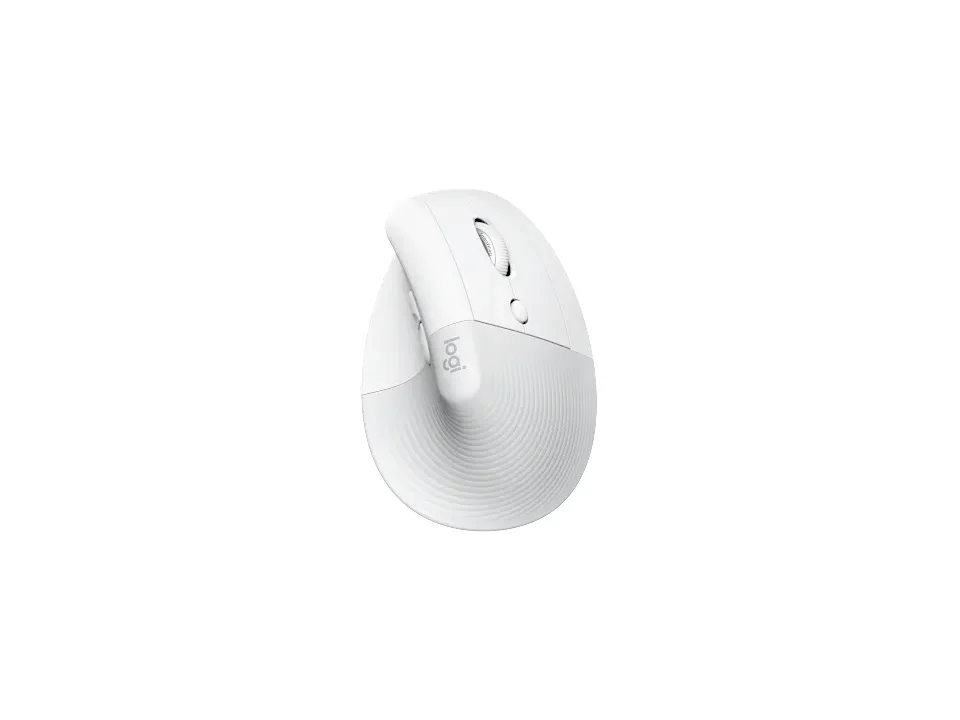
The Lift is a vertical mouse set at a 57° angle that connects by Logi Bolt receiver or Bluetooth and runs on one AA battery.
Best for
- Small to medium hands that want a vertical grip. Logitech calls it a great fit for small to medium hands.
- Left-handers. Logitech sells a left-handed version, the Lift Left, in Graphite.
Skip if
- You have large hands. Logitech names small to medium hands as its fit.
- You'd rather charge a mouse than change its battery. Logitech lists one AA and says it isn't rechargeable.
A vertical mouse still slides across the desk like any other, where a trackball stays put while you roll the ball. How the two compare is covered in our guide Vertical mouse vs. trackball: which ergonomic mouse is right for you?
Want to see it next to a keyboard and a headset? Try it on the QuickDesker board and build a whole desk setup around it.
What does it cost, and what should you check first?
- Seen at Logitech.com for $69.99 (Off-white) on 22 Oct 2026
- Seen at Best Buy for $86.46 (Off-white) on 7 Sep 2026
Prices change; check the one for the colour you want. Logitech sells it in Off-white, Sand, Rose and Graphite, and the left-handed version in Graphite.
The Logi Bolt USB receiver comes in the box, with one AA battery. The receiver needs a free USB port. Logitech says it switches between up to three devices with a press of a button. Logitech quotes battery life at 24 months. When the AA finally gives out, you swap in a fresh one instead of plugging the mouse in. The warranty is a one-year limited hardware warranty.
How upright does the Lift hold your hand?
Logitech sets the Lift at a 57-degree vertical angle, which it says promotes a natural handshake position.
Logitech gives two weights: 124g on its support specifications and 4.41 oz (125 g) on its product page.
What do the Lift's buttons and scroll wheel do?
Logitech counts the buttons two ways: 4 buttons plus a connectivity button on its support specifications, and 6 on its product page (left and right click, back and forward, a middle button, and a scroll wheel with middle click).
Logitech's Getting Started page describes Speed (inertia) scroll, for scrolling faster and with less effort through long documents and web pages. For sideways scrolling, Logitech says it lacks a dedicated side scroll wheel, but shortcuts can be mapped via Logi Options+.
Logitech marks the left and right buttons silent and rates them for 5 million clicks; it marks the wheel's middle click silent too, rated for 1 million. There's more on what a silent-click claim covers in our guide: Which Mice Have Silent Clicks, and What Do They Cover?
Full specifications
| Buttons | 4 buttons + Connectivity button (Logitech support specifications) · 6 (Left/Right-click, Back/Forward, Middle button, Scroll-wheel with middle click) (Logitech product page) |
|---|---|
| Shape | vertical angle to promote a natural handshake position |
| Vertical angle | 57° |
| Sensor type | Logitech Advanced Optical Tracking |
| Sensor | Pluto One |
| Minimum DPI | 400 |
| Maximum DPI | 4,000 DPI |
| Connections | BOLT + Bluetooth Low Energy Direct (3 channel) |
| Power | AAx1 |
| Battery life, as quoted | 24 months (not rechargeable) |
| Weight | 124g (Logitech support specifications) · 4.41 oz (125 g) (Logitech product page) |
| Switch rating | Buttons (Left / Right): 5-million clicks |
| Silent clicks claimed | Left / Right - silent |
| Horizontal scrolling | No, it lacks a dedicated side scroll wheel, but shortcuts can be mapped via Logi Options+ |
| Free-spin scroll wheel | Speed (inertia) scroll |
| Remapping software | Logi Options+ (at release) |
| Dimensions | 108mm (4.2 in) × 70mm (2.7 in) × 71mm (2.7 in) |
| Devices paired at once | up to three devices |
| Warranty | 1-Year Limited Hardware Warranty |
| In the box | Lift Vertical Ergonomic Mouse; Logi Bolt USB Receiver; 1 x AA Battery; Quick Start Guide |
Logitech's Lift support specifications and product page don't list tilt scrolling or onboard profiles.
Specifications from Logitech's Lift support specifications, product page and Getting Started page, read 7 Sep 2026.