ELECOM EX-G PRO Trackball (M-XPT1MRXBK)
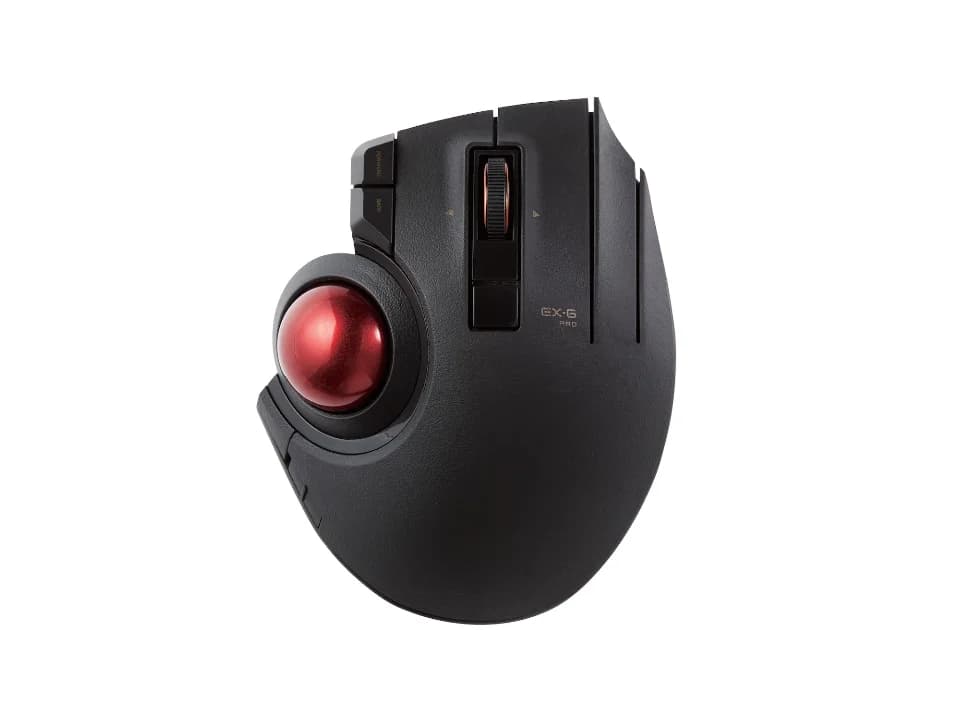
Is the EX-G PRO right for you?
The EX-G PRO is a thumb-operated trackball that connects by cable, wireless receiver or Bluetooth.
Best for
- Anyone who wants a cable, a wireless receiver and Bluetooth in one trackball. ELECOM Japan lists all three connection methods.
- People who like to set their own button functions. ELECOM Japan says you can assign the functions you want to all 8 buttons and both directions of the tilt wheel, 10 places in total.
Skip if
- You'd rather push a mouse around than roll a ball. It's a trackball you steer with your thumb.
A trackball stays where you put it while you roll the ball; a vertical mouse still slides across the desk like any other. How the two compare is covered in our guide Vertical mouse vs. trackball: which ergonomic mouse is right for you?
Want to see it next to a keyboard and a headset? Try it on the QuickDesker board and build a whole desk setup around it.
What does it cost, and what should you check first?
- Seen at ELECOM USA for $74.99 (Black) on 12 Oct 2026
- Seen at NeweggBusiness for $107.09 (Black) on 6 Sep 2026
Prices change, so check the current one before you buy. ELECOM Japan lists the connector as USB (A) male in wired and 2.4GHz wireless mode, and a USB-A plug doesn't fit a USB-C port without an adapter.
ELECOM Japan lists a 3-year warranty, and says long-life parts are what make that possible.
How does the EX-G PRO connect?
ELECOM Japan lists three ways to connect: wired, wireless and Bluetooth(R). It gives the wireless range as 10m on a non-magnetic surface such as a wooden desk, and 3m on a magnetic one such as a steel desk.
What can you assign to the EX-G PRO's buttons?
ELECOM Japan lists 8 buttons, counting the wheel button, and a tilt wheel for left and right scrolling. Button assignments can be changed using ELECOM Mouse Assistant, which ELECOM Japan says is free to download. It lists 10-million-times high-durability switches made by OMRON for the left and right buttons, and says the scroll wheel uses an optical encoder with no wear of parts during operation. There's more on whether extra buttons earn their place in our guide: Do you need a mouse with 7+ programmable buttons?
How big is the EX-G PRO, and how big is its ball?
ELECOM Japan lists the mouse at width 108.0mm, depth 135.0mm and height 47.7mm, and approx. 147g not including the battery. It lists the ball at approx. 34mm in diameter, and says it uses large artificial rubies, 2.5mm in diameter, as support balls.
Full specifications
| Buttons | 8 (including the wheel button) |
|---|---|
| Programmable controls | All buttons and the tilt wheel's 2 directions, 10 places in total |
| Shape | Trackball |
| Sensor type | Optical sensor system |
| Minimum DPI | 500 counts |
| Maximum DPI | 1500 counts |
| Connections | 3 connection methods: wired, wireless and Bluetooth(R) |
| Power | Any 1 of: AA alkaline dry battery, AA manganese dry battery, AA nickel-metal hydride battery |
| Weight | Approx. 147g (not including battery) |
| Switch rating | 10-million-times high-durability switches made by OMRON (left and right buttons) |
| Tilt scrolling | Tilt wheel that supports left and right scrolling |
| Remapping software | ELECOM Mouse Assistant, free to download |
| Dimensions | Width 108.0mm × Depth 135.0mm × Height 47.7mm |
| Receiver | Wireless receiver included |
| Warranty | 3 years |
| In the box | AA alkaline dry battery for checking operation ×1, User's manual ×1, Cable for wired connection ×1 (ELECOM Japan product page) · EX-G PRO Wireless Trackball Mouse, USB Receiver, User Manual (ELECOM USA product page) |
ELECOM Japan's M-XPT1MRXBK product page doesn't list a polling rate, how many devices it pairs with at once, a free-spin scroll wheel or silent clicks.
Specifications from ELECOM's Japanese product page, translated by QuickDesker, and ELECOM's US product page. Pages: ELECOM Japan product page (M-XPT1MRXBK) and ELECOM USA product page, read 6 Sep 2026.