CORSAIR Scimitar Elite Wireless SE
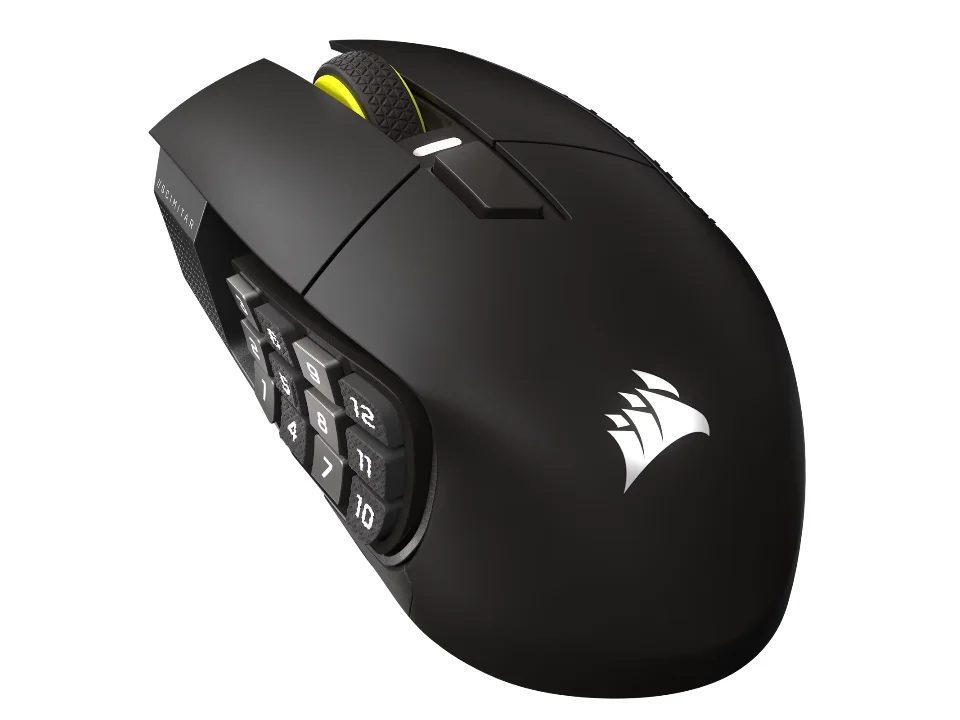
Is the Scimitar Elite Wireless SE right for you?
The Scimitar Elite Wireless SE is Corsair's right-handed wireless MMO mouse: it runs on a rechargeable battery and connects by SLIPSTREAM 2.4GHz wireless or Bluetooth.
Best for
- MMO and MOBA players who put abilities on the mouse. Corsair says each of its 16 buttons can take a macro, an ability or a keybind in its iCUE software.
- Players who'd like to move the side buttons forward or back. Corsair's 12-button panel slides across 8mm of travel.
Skip if
- You want just a couple of thumb buttons. Twelve of its 16 buttons sit on the side panel.
Want to see it next to a keyboard and a headset? Try it on the QuickDesker board and build a whole desk setup around it.
What does it cost, and what should you check first?
- Seen at Corsair.com for $59.99 (White (Revival Series)) on 12 Oct 2026
- Seen at Best Buy for $113.99 (White) on 12 Oct 2026
Prices change; check the one for the colour you want. Corsair lists it in Gun Metal, White and Black & Yellow.
It charges over the included USB-C to USB-A cable from any USB 2.0 or 3.0 port, and Corsair says a full recharge takes 60 minutes or less. A USB-A plug won't go into a USB-C port without an adapter. For Bluetooth, Corsair says it works with devices that support Bluetooth 4.0 or higher. Corsair backs it with a 2-year limited warranty, but its page for the White (Revival Series) lists a 90-day warranty.
Amazon's listing is the White version.
How do the 16 buttons and the sliding side panel work?
The Scimitar Elite Wireless SE has 16 programmable buttons, and 12 of them sit on a side panel Corsair calls the Key Slider. To move it, Corsair says you loosen a screw on the underside, slide the panel along 8mm of travel with no fixed steps, then tighten it again.
You set the buttons up in Corsair's iCUE software, where Corsair says you can program macros and remap buttons. Corsair says each of the mouse's three onboard profile slots keeps its own DPI settings, button assignments and lighting effects. Corsair rates its optical switches for 100 million clicks. There's more on whether you'd use all 16 in our guide: Do you need a mouse with 7+ programmable buttons?
How long does the battery last, and how does it connect?
Corsair quotes up to 150 hours on SLIPSTREAM wireless and up to 500 hours on Bluetooth, both with RGB lighting off. Lighting runs off the same battery, so with it on you'll be charging sooner.
SLIPSTREAM goes through a USB dongle and reports at 1,000Hz, which means the mouse sends its position to your computer once every millisecond. Bluetooth needs no dongle. Corsair adds that one SLIPSTREAM dongle can be shared by up to three compatible devices, such as a mouse and a keyboard. How the two links compare is covered in our guide Wired, 2.4 GHz or Bluetooth: which mouse connection is actually fastest?
Full specifications
| Buttons | 16 |
|---|---|
| Programmable controls | 16 |
| Shape | ergonomic contoured shape designed primarily for a palm grip |
| Handedness | right-hand |
| Sensor type | OPTICAL |
| Sensor | CORSAIR MARKSMAN S 33K DPI OPTICAL SENSOR |
| Minimum DPI | 1 |
| Maximum DPI | 33,000 DPI |
| Polling rate | 1,000Hz (1ms) polling over 2.4GHz SLIPSTREAM wireless |
| Connections | SLIPSTREAM WIRELESS 2.4GHz and Bluetooth connectivity |
| Power | rechargeable battery |
| Battery life, as quoted | up to 150 hours of battery life via 2.4GHz SLIPSTREAM wireless with RGB lighting off, and up to 500 hours via Bluetooth with RGB lighting off |
| Weight | 114g without cable or accessories |
| Switch rating | 100 million clicks |
| Lighting | TWO-ZONE RGB LIGHTING |
| Remapping software | CORSAIR iCUE |
| Onboard profiles | three onboard profile slots |
| Dimensions | 119.23mm (L) x 73.48mm (W) x 42.17mm (H) |
| Maximum tracking speed | 750 IPS |
| Maximum acceleration | 50G |
| Receiver | USB dongle |
| Charging port | included USB-C to USB-A cable connected to any USB 2.0 or 3.0 port |
| Warranty | 2-year limited warranty. White (Revival Series): 90-day warranty |
Corsair's Scimitar Elite Wireless SE product page and quick start guide don't list silent clicks, tilt or horizontal scrolling, or a free-spin scroll wheel.
Specifications from Corsair's Scimitar Elite Wireless SE product page, quick start guide and White (Revival Series) product page, read 26 Sep 2026.