Keyboard layouts explained: key blocks, ANSI vs ISO, and what a percentage hides
A conventional keyboard is five blocks of keys and a decision about which ones to keep. What ANSI and ISO actually change, why two 60% boards hold different key counts, and the bottom-row question that decides whether a keycap set will fit.
Updated 30 Aug 2026 · no hands-on testing
The short answer
Conventional desktop keyboards are assembled from the same five blocks: the letters and numbers in the middle, the modifier keys wrapped around them, a function row along the top, a navigation cluster with the arrows, and a number pad on the right. A layout is a decision about which of those blocks to keep and how tightly to pack what survives, and the percentages on product pages are shorthand for that decision. Split and columnar boards such as ZSA's Moonlander and the ErgoDox are laid out on a different principle entirely, with the keys in straight columns and the halves separated, and they are outside what this guide covers.
Two things decide whether you can ever change the keycaps: the standard your keys are cut to, and the width of your bottom row. ANSI and ISO are the two Latin standards, and they differ at four positions rather than everywhere, which is enough to rule out a full set cut for the other one. The bottom row is the row nobody checks and the one that most often stops a replacement set from fitting.
The picks
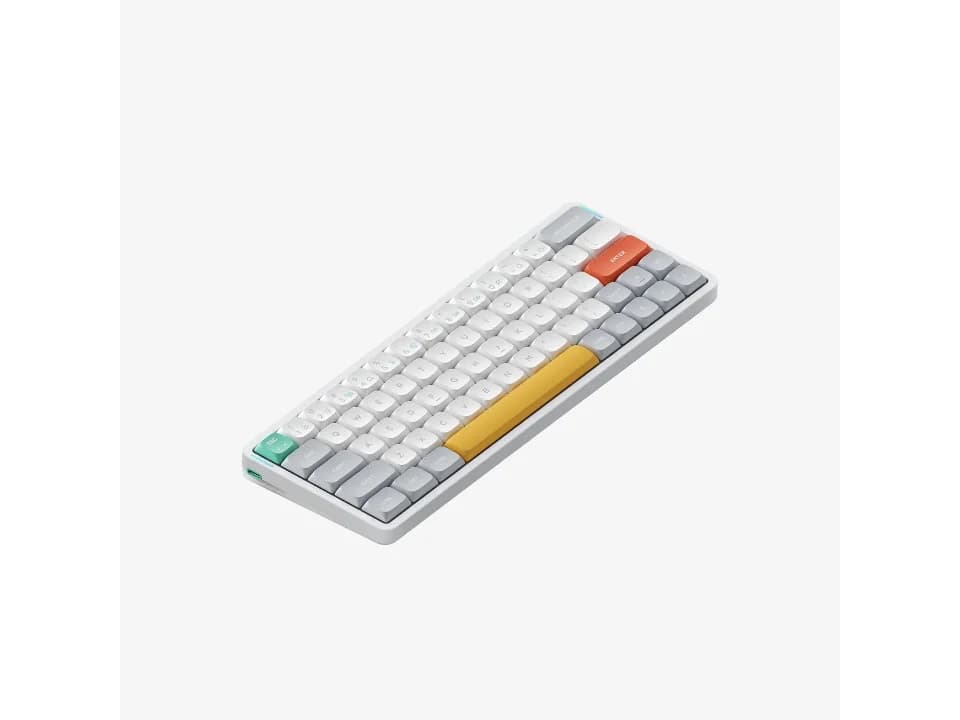
A board that tells you which standard it is cut to
$109.95 seen 16 Sep 2026; check the current price
Its own layout name states the standard, which hardly any vendor bothers to do: NuPhy calls it ANSI 60% and publishes 64 keys. It was seen at $109.95 on 16 Sep 2026; check the current price. Naming the standard costs a vendor nothing and saves you a guess, which makes the silence everywhere else strange.
Check price on AmazonPaid link — QuickDesker may earn a commission.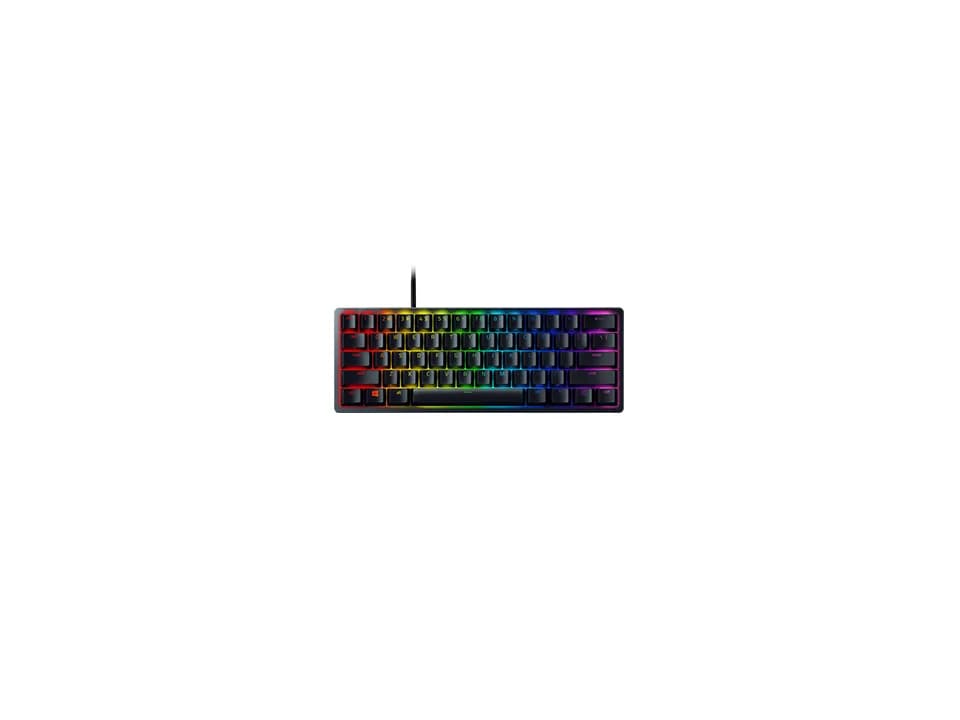
The other 60%, three keys lighter
$69 seen 27 Oct 2026; check the current price
Razer publishes 61 keys under the same 60% heading. It was seen at $69 on 27 Oct 2026; check the current price. Set against the NuPhy above, this is the cleanest proof on this page that a percentage names a family rather than a layout, and that you have to read the key count to know what you are getting.
Check price on AmazonPaid link — QuickDesker may earn a commission.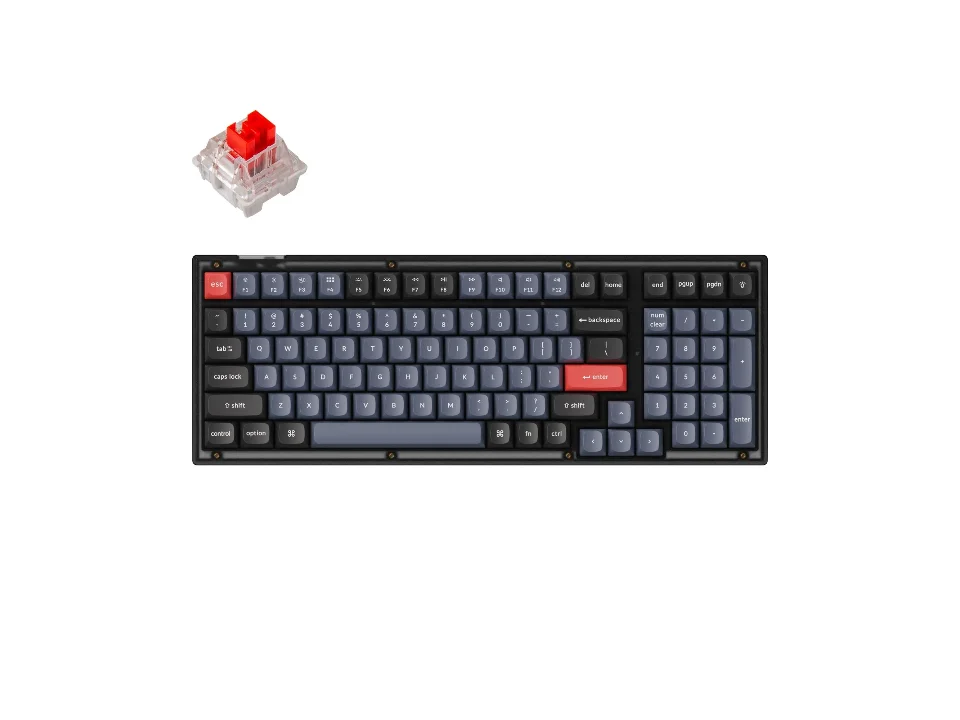
The number pad, with the gaps taken out
$64.99 seen 20 Oct 2026 (sold out); check the current price
96 keys in a layout Keychron calls 96% or 1800 compact, which keeps the number pad and deletes the empty channels around it. It was seen at $64.99 on 20 Oct 2026 (sold out); check the current price. It is also the layout most likely to need a keycap compatibility kit, because squeezing the blocks together produces key sizes a normal set does not include.
Check price on AmazonPaid link — QuickDesker may earn a commission.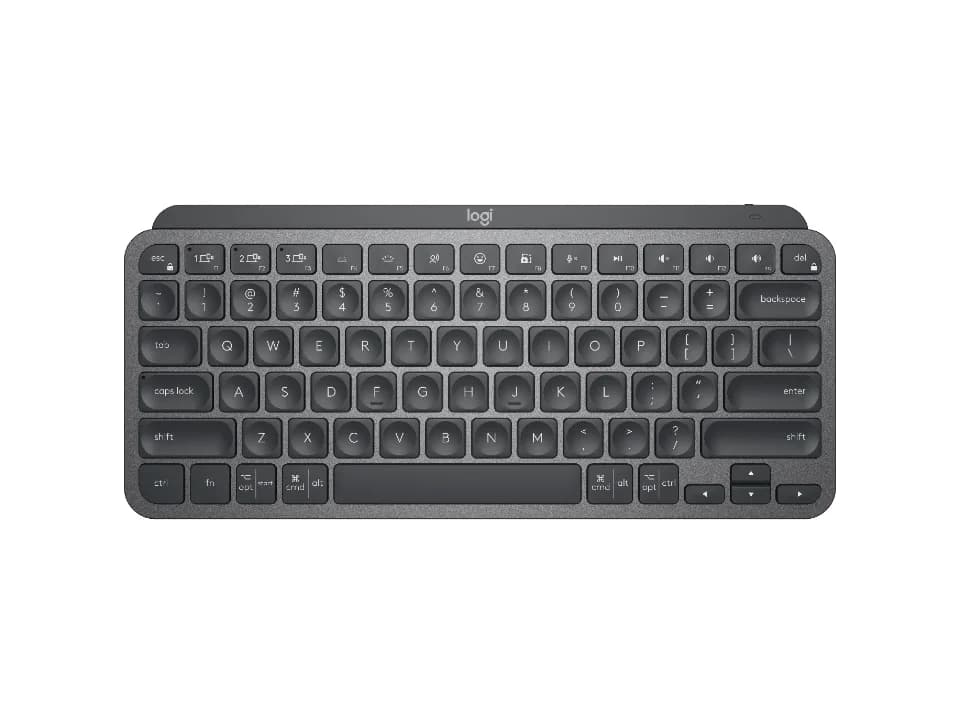
A layout that refuses to be a percentage at all
$99.99 seen 23 Oct 2026; check the current price
Logitech describes it as a compact 79-key board with no number pad and does not reach for a percentage anywhere. It was seen at $99.99 on 23 Oct 2026; check the current price. A useful reminder that the percentage convention belongs to the mechanical and enthusiast end of the market, and that plenty of good office boards simply ignore it.
Check price on AmazonPaid link — QuickDesker may earn a commission.
What are the blocks of keys on a keyboard?
Five of them, and once you can see them the whole naming mess resolves. In the middle sits the alphanumeric block, the letters and the number row, which no keyboard drops. Around it are the modifiers: Shift, Ctrl, Alt, the Windows or Command key, Caps Lock, Tab, Enter and the spacebar. Along the top runs the function row, F1 to F12, usually with Escape at its left end. To the right of the letters is the navigation cluster, meaning Insert, Delete, Home, End, Page Up and Page Down, with the four arrow keys sitting below it in an inverted T. Furthest right is the number pad.
A full-size board keeps all five. Tenkeyless drops the number pad, which is where the name comes from, since the pad is ten digit keys plus its operators. Below that the compression gets more aggressive: the navigation cluster is the next thing to go, usually surviving as a column beside the arrows or vanishing into a modifier, and the function row is the last thing standing before a board becomes genuinely small.
That ordering is not arbitrary. Blocks disappear roughly in the order that a typical person stops touching them, which is why the letters are safe and the number pad is the first casualty. Whether it matches how you personally work is the actual question, and the article written to answer it is Full-size, TKL or compact: which keyboard size should you get?
Where did the standard keyboard layout come from?
IBM's Enhanced Keyboard, in 1985, and it has barely moved since. It shipped with 101 keys in the US layout and 102 internationally, and it is the machine that put the function row along the top edge rather than in a block beside the letters, gave Insert and Delete and the page keys their own cluster, and arranged the four arrows in the inverted T that every keyboard on your desk still uses.
Deskthority's entry on it and Sharktastica's history of the design agree on what happened next: the layout became the industry standard and survives in an extended 104 and 105-key form, the extension being the Windows keys and the menu key added in the mid-1990s. Forty years is a long time for an interface decision to hold.
This matters for a practical reason rather than a nostalgic one. Because everything descends from one 1985 arrangement, key sizes and positions are consistent enough across brands that a keycap set made by a company you have never heard of will usually fit a board made by a company that has never heard of them. The compatibility you take for granted is an inheritance, and the boards that break it are the ones that departed from the 1985 grid.
What is the difference between ANSI and ISO layouts?
The Enter key and the left Shift, and that is very nearly the whole of it. Logitech's own explainer sets it out: an ANSI full-size board has 104 keys with a wide horizontal Enter and a long left Shift, while an ISO board has 105 with a tall L-shaped Enter and a shorter left Shift that makes room for one extra key beside it. Akko's guide gives the same figures and adds the smaller sizes, where the gap holds steady at one key: 87 against 88 at tenkeyless, 68 against 69 at 60%.
An ISO board also carries a key marked AltGr where an ANSI board has a second Alt, and that legend is the physical half of the story rather than the whole of it. What the key actually does is decided by the software layout, not by the board: Microsoft's own documentation describes the behaviour as belonging to "keyboard layouts that appropriate the right alt key for altGr", and Logitech qualifies its own AltGr note as Windows-only. Select US-International on an ANSI keyboard and you have AltGr with no ISO hardware anywhere near your desk; run a plain US layout on an ISO board and the same key is a plain right Alt.
Logitech's rough geography is that ANSI covers the United States, Canada, Australia and a good deal of Asia, while ISO is the European and British standard.
Neither is better and you almost certainly want whichever one your country sells you, since the legends have to match the characters your operating system produces. Where the two standards actually stop being interchangeable is narrower than it sounds, and Logitech is careful about it: asked whether the keycaps swap, it answers "Generally, no", and locates the problem at the Enter, Shift and surrounding keys. It separately lists the keys that are much the same on both, which is most of them. Four positions do the damage: Enter, the left Shift, the extra key beside that Shift, and where the backslash sits.
Four positions are enough, because a keycap set is sold as a set. Lemokey, a Keychron brand, puts it on its own product pages without hedging: an ISO keycap set is not compatible with any ANSI set, and the reverse, which is why it sells them as separate per-language variants. So the buyer-facing answer holds. A set bought for one standard will not fit the other, and you should buy for the board you own.
What actually bridges the gap is a conversion kit, sold separately from the set. Krome Keycaps sells individual ISO Enter caps and full ANSI-to-ISO conversion kits sized for 60%, 65%, 75%, 96% and full-size boards, which is the route to take if you have fallen for a set cut for the wrong standard. Akko adds the commercial background: ANSI sets are everywhere and ISO sets are comparatively rare, so the conversion usually runs in one direction. If replacing your keycaps some day matters to you, that is a real argument, and it is close to the only one either standard has over the other.
Why do two 60% keyboards have different numbers of keys?
Because a percentage describes roughly how much width a board keeps, and nobody administers what has to be inside it. The demonstration is sitting in plain sight: Razer Huntsman Mini is published as a 60% board with 61 keys, and NuPhy Air60 V2 is published as a 60% board with 64. Same label, three keys of difference, and the difference is not decorative.
The extra keys on a slightly wider board tend to be arrows, or a column of navigation keys down the right edge, and those are exactly the keys a strict 60% makes you reach through a modifier for. So the number you actually want on the product page is the key count, not the percentage, and the second number you want is what the vendor says is in that count.
Only some manufacturers publish a key count. The table below is built from the boards that do. Where a manufacturer does not publish one we record nothing rather than counting keys in a product photograph, and a missing figure in that table means exactly that.
What is a layer, and how do you get a missing key back?
A layer is the whole keyboard reinterpreted while you hold one key down. Shift is the layer everybody already understands: hold it and the entire board means something else. Fn works the same way, and on a board with no function row it is what turns the number row into F1 through F12 for as long as your thumb is on it.
That is the trick that makes small boards workable at all, and it scales further than most people realise. Firmware can define several layers, so one board can carry a function row, a navigation cluster and a number pad stacked on top of each other, each reached by a different modifier. Nothing is missing in the sense of being gone. It is one press further away.
How much control you get over that arrangement depends on the firmware, and boards fall into three groups. Some run QMK and VIA, which are open firmware and a graphical editor for it, and let you put any key anywhere on any layer without writing code. Some run a manufacturer's own application instead, where remapping exists but stays inside what the vendor chose to expose. The rest offer nothing at all, and on those the layout is a physical fact you live with.
If you are considering a small board, this is the feature that decides whether the compromise is bearable. A 60% you can remap is a board with your keys in unfamiliar places. A 60% you cannot remap is a board with somebody else's opinions in unfamiliar places.
Will a replacement keycap set fit your keyboard?
Three things have to line up, and CORSAIR states them in the same order on its own compatibility page: a standard bottom row, MX-stem switches, and MX-stem stabilisers under the big keys. Miss any one and the set will be partly unusable rather than slightly wrong.
Keycap widths are measured in units, written u, where 1u is one letter key. MonsGeek's compatibility guide gives the convention most full-size and tenkeyless boards follow: modifiers along the bottom row at 1.25u with a 6.25u spacebar. Depart from that and you have a non-standard bottom row, which usually means a wider spacebar, some boards use 7u, or modifiers at sizes a normal set does not include.
Compact and squeezed layouts are where this bites. MonsGeek notes that 65% and 75% boards commonly need a 1.75u right Shift, and that the 1800-compact family needs its own number pad keys and odd 1u and 1.5u modifiers, which is why sets aimed at those layouts ship what vendors call a compatibility kit. So the general shape of the rule is unkind: the smaller and cleverer the layout, the more likely a keycap set will leave you with four keys you cannot replace.
Start with the switch stem: an MX-compatible keycap needs a compatible MX-style stem. Then check key sizes, stabilisers and clearance. Low-profile keyboards need particular care because switch and keycap compatibility varies by design. Do not assume caps are interchangeable on a scissor or membrane keyboard.
So which layout should you actually buy?
Start from the blocks rather than the percentage. Decide whether you enter numbers often enough to want the pad, then whether you use F keys often enough to want them under a finger rather than under a modifier. Those two answers pick your size, and everything below that is packing.
Then read the key count and, if you can find it, the standard. A board that publishes 84 keys and calls itself ANSI 75% has told you what you are getting. A board that says 75% and nothing else has told you a price bracket.
For the board-by-board version of this, with our own size tag defined by what is physically present rather than by a percentage, read Full-size, TKL or compact: which keyboard size should you get? And if you want to see these keyboards alongside the mice and headphones instead of on their own, the setup builder puts all three columns together.
How do these keyboards compare by layout and key count?
| Product | Keys | Vendor's own name for it | Number pad | Remapped with | Price when seen | Where to buy |
|---|---|---|---|---|---|---|
| SteelSeries Apex 3 | Not recorded | Full Size | Not recorded | Not recorded | $49.99 (seen 4 Oct 2026) | Check price on AmazonPaid link |
| Logitech Wave Keys | Not recorded | Compact layout with number pad | Yes | Logi Options+ | $69.99 (seen 16 Sep 2026) | Check price on AmazonPaid link |
| Logitech Alto Keys K98M | 98 | 98 key | Yes | Logitech Options+ | $99.99 (seen 20 Oct 2026) | Check price on AmazonPaid link |
| Keychron V5 | Not recorded | 96% | Not recorded | Not recorded | $64.99 (seen 20 Oct 2026 (sold out)) | Check price on AmazonPaid link |
| Cherry Stream Keyboard TKL | 87 | TKL / 80% (87 keys + 6 media keys) | No | Not recorded | $24.28 (seen 20 Oct 2026) | Check price on AmazonPaid link |
| Keychron C3 Pro | Not recorded | TKL (80%) | No | QMK/VIA | $34.99 (seen 11 Sep 2026) | Check price on AmazonPaid link |
| Keychron K8 Pro | 87 | TKL (87 key) | No | QMK & Keychron Launcher | $74.99 (seen 19 Oct 2026 (sold out)) | Check price on AmazonPaid link |
| Keychron K2 Pro | 84 | 75% compact (84 key) | No | QMK & Launcher | $67.99 (seen 11 Sep 2026) | Check price on AmazonPaid link |
| NuPhy Air75 V2 | 84 | ANSI 75% (84 key) | No | QMK/VIA | $129.95 (seen 16 Sep 2026) | Check price on AmazonPaid link |
| Logitech MX Mechanical Mini | 84 | 75% (84 key, function row, no number pad) | No | Logi Options+ | $129.99 (seen 23 Oct 2026) | Check price on AmazonPaid link |
| Keychron K3 Max | 84 | 75% (84 key) | No | QMK & Launcher | $99.99 (seen 11 Sep 2026) | Check price on AmazonPaid link |
| Logitech MX Keys Mini | Not recorded | Not recorded | Not recorded | Logi Options+ | $99.99 (seen 23 Oct 2026) | Check price on AmazonPaid link |
| NuPhy Air60 V2 | 64 | ANSI 60% (64 key) | No | QMK/VIA | $109.95 (seen 16 Sep 2026) | Check price on AmazonPaid link |
| Razer Huntsman Mini | Not recorded | 60% | No | Razer Synapse | $69 (seen 27 Oct 2026) | Check price on AmazonPaid link |
These are the boards whose manufacturer publishes a key count. Reading down the layout column shows the problem with percentages: 84 keys appears under four different vendor names, and 60% appears twice with two different counts.
Prices are what we saw on the dates shown, not live figures. A lot of them were promotional when we read them, so check the current price before you buy.
Paid link — QuickDesker may earn a commission.
“Not recorded” means this comparison has no sourced value for that specification. It does not mean the product lacks the feature.
Common questions
- What is the difference between ANSI and ISO keyboards?
The Enter key and the left Shift. Logitech's own comparison puts an ANSI full-size board at 104 keys with a wide horizontal Enter and a long left Shift, against an ISO board at 105 with a tall L-shaped Enter and a shortened left Shift that makes room for one extra key. An ISO board also carries a key legended AltGr where ANSI has a second Alt, though what that key does is set by the software layout rather than by the board.
ANSI is standard in the United States, Canada, Australia and much of Asia; ISO is the European and British standard. Most individual keycaps are much the same on both, but a full set is not: Logitech answers the swap question with "Generally, no" and points at Enter, Shift and the keys around them, and Lemokey states outright that an ISO set is not compatible with an ANSI one. Buy the set for the standard your board uses, or buy a conversion kit for the four keys that differ.
- Does an ISO keyboard give you AltGr?
It gives you a key with AltGr printed on it. Whether that key behaves as AltGr is decided by the layout your operating system is running, not by the keyboard. Microsoft's documentation frames it exactly that way, describing the behaviour as belonging to layouts that appropriate the right alt key for AltGr, and Logitech notes its own AltGr entry applies to Windows.
The practical consequence runs both ways. An ANSI board set to US-International produces AltGr with no ISO hardware involved, and an ISO board set to a plain US layout gives you a right Alt with the wrong legend on it. The physical standard and the software layout are two separate choices that happen to be sold together.
- How many keys does a full-size keyboard have?
104 in the ANSI layout and 105 in ISO. Akko's guide carries the same one-key gap down the sizes: 87 against 88 for tenkeyless, and 68 against 69 at 60%.
Treat those as the standard rather than a guarantee. Plenty of real boards land beside them because a vendor added media keys or squeezed two blocks together, which is why the table above runs from 61 keys to 104.
- Why do two keyboards called 60% have different key counts?
Because the percentage is an informal description of width and nothing enforces what is inside it. Razer Huntsman Mini publishes 61 keys and NuPhy Air60 V2 publishes 64, both under the same 60% heading.
The extra keys are usually arrows or a navigation column, which are precisely the keys you would otherwise reach through a modifier. Read the key count, not the percentage.
- What does 1u mean on a keycap?
It is the width of a single letter key, and every other cap is described as a multiple of it. A 1.25u cap is a quarter wider, a 2u cap is twice as wide, and the spacebar on a standard bottom row is 6.25u.
MonsGeek's compatibility guide gives that 1.25u modifier and 6.25u spacebar pairing as the convention most full-size and tenkeyless boards follow, and notes that some designs use a 7u spacebar instead, which is one of the ways a bottom row becomes non-standard.
- Will any keycap set fit my mechanical keyboard?
No. Check the set’s supported switch stems and stabilisers, then compare its key sizes with your keyboard’s layout. A compatibility list for one keycap set is not a rule that covers every set.
The bottom row and right Shift are worth checking closely. A layout may need key sizes that a basic set does not include. On a low-profile keyboard, use the keyboard and keycap makers’ compatibility lists rather than assuming every standard set will fit or every low-profile board will reject it.
- Can I move the keys around in software?
On many boards, yes, and the difference between firmware types is worth checking before you buy. Some run QMK and VIA, which let you assign any key to any position on any layer through a graphical editor, with the mapping stored on the keyboard itself. Others run a manufacturer application, which usually remaps but only within what the vendor exposes.
The rest cannot be remapped at all beyond whatever your operating system offers. On a small board that is a bigger deal than it sounds, because remapping is how you decide where the keys the layout dropped end up.
What this is based on
We have not tested these products. The comparisons use manufacturer specifications and retailer information, with sources linked below. Prices are dated snapshots and may have changed.
The layout history follows two independent accounts read on 2026-08-26, the Deskthority wiki's entry on the IBM Enhanced Keyboard and Sharktastica's history of the same design, which agree that it arrived in 1985 with 101 keys in the US layout and 102 internationally, that it introduced the top function row, the separate navigation cluster and the inverted-T arrows, and that it became the industry standard still in use in extended 104 and 105-key form.
The ANSI and ISO figures are Logitech's and Akko's own published comparisons, read on 2026-08-26, which agree on the key counts, the Enter and Shift shapes, the AltGr key and the regions.
On whether ANSI and ISO keycaps swap, the sources are more careful than the shorthand, and this page follows them rather than the shorthand. Logitech answers "Generally, no", names Enter, Shift and the keys around them, and separately lists the keys that are much the same on both. At set level Lemokey states outright that an ISO set is not compatible with an ANSI one, and the conversion-kit route for the four keys that differ is Krome Keycaps'. All three were read on 2026-08-28 and are linked below.
The AltGr paragraph keeps the physical standard and the software layout apart, because the sources do. Microsoft's documentation makes the behaviour conditional on the layout in use rather than on the board, describing it as belonging to layouts that appropriate the right alt key, and Logitech marks its own AltGr note as applying to Windows.
The keycap fitment rules come from CORSAIR's own compatibility page for its keycap sets, which names a standard bottom row, MX-stem switches and MX-stem stabilisers as the requirements, and from MonsGeek's compatibility guide for the unit convention, the 1.25u and 6.25u standard bottom row, the 7u exception and the non-standard sizes that 65%, 75% and 1800-compact layouts need.
No layout on this page has been lived with by anybody who works on this site, so there is nothing here about how one feels after a fortnight. What is here is which keys each manufacturer says are present, and what each standard specifies.
Key counts, layout labels and firmware types all come from each manufacturer's own published specification. Where a manufacturer publishes no key count we record none rather than counting keys in a photograph.
Sources (34)
- Best Buy: CHERRY STREAM TKL Wired Keyboard: Pale Gray (Retailer, read 16 Aug 2026)
- Best Buy: Logitech Alto Keys K98M (Graphite) (Retailer, read 4 Oct 2026)
- Best Buy: Logitech MX Keys Mini (Black) (Retailer, read 4 Oct 2026)
- Best Buy: Razer Huntsman Mini 60% Wired Optical Clicky Switch Gaming Keyboard with Chroma RGB Backlighting Black (Retailer, read 4 Oct 2026)
- Best Buy: SteelSeries Apex 3 Full Size Wired Membrane Whisper Quiet Switch Gaming Keyboard with 10 zone RGB Backlighting Black (Retailer, read 4 Oct 2026)
- Cherry: CHERRY STREAM KEYBOARD TKL: corded compact keyboard (Manufacturer, read 16 Aug 2026)
- Keychron: Keyboards Comparison (Manufacturer, read 14 Sep 2026)
- Keychron: Keychron C3 Pro QMK/VIA Wired Mechanical Keyboard (Manufacturer, read 11 Sep 2026)
- Keychron: Keychron K2 Pro QMK/VIA Wireless Mechanical Keyboard (Manufacturer, read 24 Sep 2026)
- Keychron: Keychron K3 Max QMK/VIA Wireless Custom Mechanical Keyboard (Manufacturer, read 24 Sep 2026)
- Keychron: Keychron K8 Pro QMK/VIA Wireless Mechanical Keyboard (Manufacturer, read 11 Sep 2026)
- Keychron: Keychron V5 QMK Custom Mechanical Keyboard (Manufacturer, read 14 Sep 2026)
- Krome Keycaps: ISO/ANSI Conversion Kits (sells individual ISO Enter caps and full conversion kits sized for 60%, 65%, 75%, 96% and full-size boards) (Manufacturer, read 28 Aug 2026)
- Lemokey: ISO & ANSI L3 OEM Dye-Sub PBT Keycap Set (states "ISO keycap set is NOT compatible with any ANSI set, and vice versa", and sells ANSI and ISO as separate per-language variants) (Manufacturer, read 28 Aug 2026)
- Logitech: Alto Keys K98M Wireless Keyboard with Gasket Structure (Manufacturer, read 26 Sep 2026)
- Logitech: ANSI vs ISO Keyboards (answers the keycap-swap question "Generally, no. ANSI and ISO keycaps differ in size and shape, especially for the Enter, Shift, and surrounding keys", separately lists the keys that are similar on both, and marks its AltGr note "only for Windows") (Manufacturer, read 28 Aug 2026)
- Logitech: Computer Keyboards: Wireless, Bluetooth, Mechanical (store listing) (Retailer, read 16 Aug 2026)
- Logitech: MX Keys Mini Wireless Keyboard (Manufacturer, read 16 Sep 2026)
- Logitech: MX Mechanical Mini Wireless Keyboard ("Also available in a full-size version with an integrated numpad. See MX Mechanical") (Manufacturer, read 16 Aug 2026)
- Logitech: Specification - Alto Keys K98M (Manufacturer, read 26 Sep 2026)
- Logitech: Specification - MX Keys Mini (Manufacturer, read 16 Sep 2026)
- Logitech: Specification - Wave Keys (Manufacturer, read 16 Sep 2026)
- Logitech: Wave Keys Ergonomic Wireless Keyboard (Manufacturer, read 16 Sep 2026)
- Logitech.com: Logitech Wave Keys (Off-white) (Retailer, read 4 Oct 2026)
- Microsoft Learn: Hot Keys and altGr (states "On keyboard layouts that appropriate the right alt key for altGr, pressing altGr sends both a WM_KEYDOWN message for a left ctrl and a WM_KEYDOWN message for a right alt", making the behaviour conditional on the layout) (Editorial, read 28 Aug 2026)
- NuPhy: NuPhy Air60 V2 Wireless Mechanical Keyboard (Manufacturer, read 24 Sep 2026)
- NuPhy: Nuphy Air75 : Wireless & Low Profile Keyboard Mechanical (Manufacturer, read 16 Sep 2026)
- NuPhy.com: NuPhy Air60 V2 - Ionic White / Brown 2.0 (Retailer, read 16 Sep 2026)
- Razer: Razer Huntsman Mini (Manufacturer, read 16 Sep 2026)
- Razer: Razer Huntsman Mini - Clicky Optical Switch - US - Black (Razer.com) (Manufacturer, read 16 Sep 2026)
- SteelSeries: Apex 3 US (Manufacturer, read 16 Sep 2026)
- Tom's Hardware: Logitech MX Mechanical Keyboard Review: the Mini has 84 keys and "all the hallmarks of a 75 percent layout" (Editorial, read 16 Aug 2026)
- Trusted Reviews: Logitech MX Mechanical Mini review: "It's a 75% layout keyboard, which means it's ditched the number pad, but retained the row of F-keys up top as well as the arrow keys" (Editorial, read 16 Aug 2026)
- ZSA: Moonlander Mark I (a split desktop keyboard laid out in straight columns rather than the staggered five-block arrangement, described alongside the ErgoDox EZ as columnar) (Manufacturer, read 30 Aug 2026)
Related guides
Build your setup
Compare keyboards, mice and headphones in the setup builder, then save the combination you like. Prefer a list? Browse all products.