Keychron Q1 Max
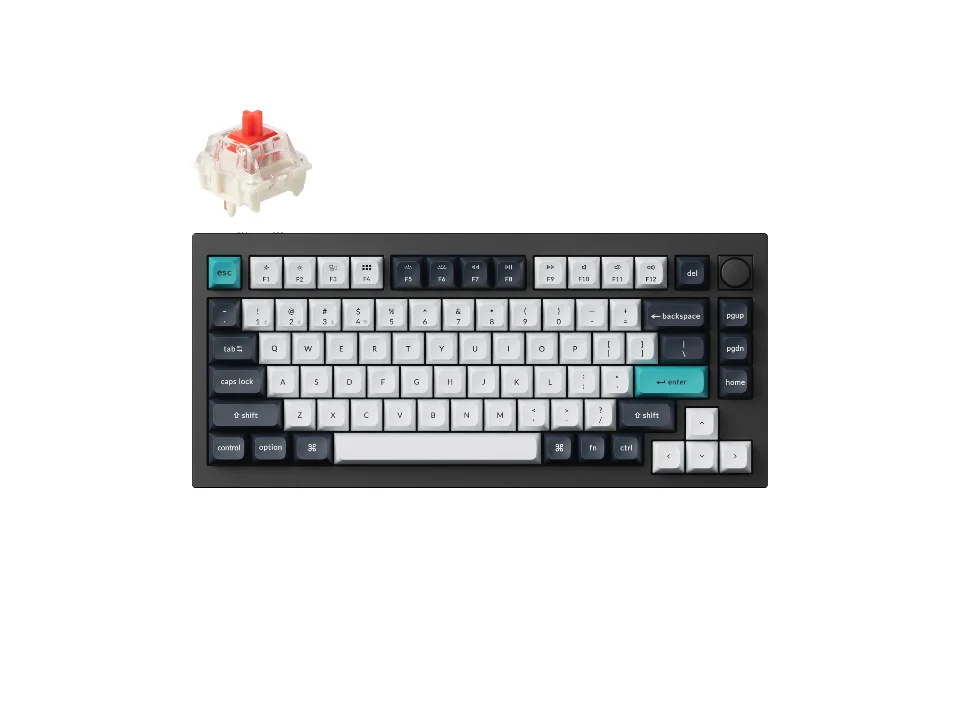
Is the Q1 Max right for you?
The Q1 Max is an aluminum mechanical keyboard in a 75% layout that connects by 2.4 GHz, Bluetooth or Type-C cable.
Best for
- Tinkerers. The switches hot-swap, and the keys remap with open-source QMK firmware and Keychron's Launcher web app.
- People who move between devices. Keychron says it connects to three devices over Bluetooth 5.1.
Skip if
- You'd carry it between desks. Keychron lists the fully assembled weight as 1724 g ± 10 g.
Want to see it next to a mouse and a headset? Try it on the QuickDesker board and build a whole desk setup around it.
What does it cost, and what should you check first?
- Seen at Keychron.com for $229.99 (Fully Assembled Knob / Carbon Black / Gateron Jupiter Red) on 19 Oct 2026
Prices change; check the one for the switch you want. Keychron sells it in Carbon Black, Shell White and Purple, fully assembled with Gateron Jupiter Brown, Red or Banana switches. The Barebone build, in Carbon Black or Shell White, comes without keycaps and switches.
Keychron lists macOS, Windows and Linux as compatible. It says the Q1 Max has a system toggle and can save two layouts on the keyboard, one for Windows and one for macOS, and the fully assembled builds include both Mac and Windows keycaps.
Which switches does the Q1 Max come with, and can you swap them?
Keychron lists Gateron Jupiter Brown, Red and Banana switches for the fully assembled builds.
Keychron says you can hot-swap every switch with "almost all of the 3pin and 5pin MX style mechanical switches on the market" without soldering. A hot-swap socket lets you pull a switch out and push another in, so you can change switches later. What the sockets are good for is covered in our guide Hot-swappable keyboards explained: what the sockets do, and who needs one.
How long does the battery last, and which connection should you use?
Keychron's wireless figure is up to 180 hours with the backlight off and up to 100 hours with RGB at its lowest brightness, from a 4000 mAh battery.
Polling rate is how often the keyboard tells the computer what you pressed. Keychron lists 1000 Hz on 2.4 GHz and the cable, and 90 Hz over Bluetooth, so for fast games use 2.4 GHz or the cable.
Full specifications
| Layout | 75% Compact |
|---|---|
| Connections | 2.4 GHz / Bluetooth 5.1 / Type-C Wired |
| Battery | 4000 mAh Rechargeable li-polymer battery |
| Battery life, as quoted | Up to 180 hours (Wireless Working Time, Backlit off). Up to 100 hours (Wireless Working Time, RGB, lowest brightness). |
| Dimensions | 145 x 327.5mm |
| OS compatibility | macOS/Windows/Linux |
| Switch technology | mechanical |
| Switch options offered | Gateron Jupiter Brown | Gateron Jupiter Red | Gateron Jupiter Banana |
| Hot-swappable switches | Yes |
| Backlight | South-facing RGB LED |
| Keycap material | Double-shot PBT |
| Case material | Aluminum |
| Weight | 1724 g ± 10 g (Fully Assembled version) |
| Polling rate | 1000 Hz (2.4GHz & wired). 90 Hz (Bluetooth). |
| Remapping software | open-source QMK firmware; Keychron Launcher web app |
| Keycap profile | KSA; OSA |
| N-key rollover | Yes (wireless & wired) |
| Mount | Double Gasket Design |
| Sound dampening | acoustic foams such as IXPE, PET, and Latex |
| Devices paired at once | via Bluetooth 5.1 to three devices |
| In the box | The Fully Assembled version includes: The keyboard PCB, the case, and the PC plate. Keycaps (included Mac & Windows keycaps). Switches. The Barebone version does not include the keycaps and switches. |
Keychron's Q1 Max product page doesn't list a key count, the actuation force, key travel, a receiver or spill resistance.
Specifications from Keychron's Q1 Max product page, read 11 Sep 2026.