Logitech MX Anywhere 3S
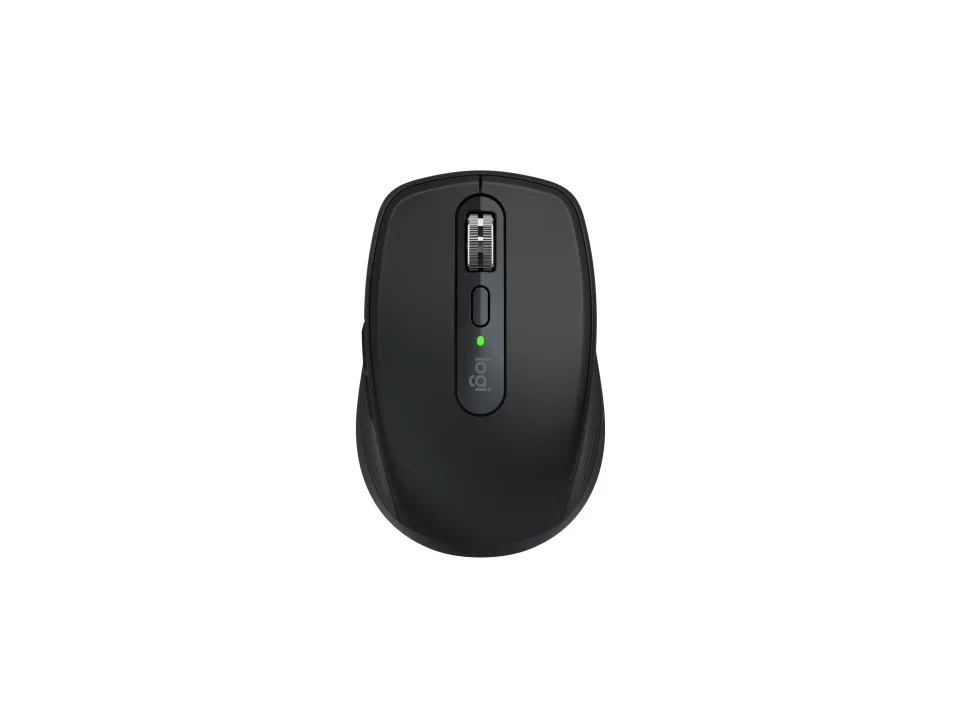
Is the MX Anywhere 3S right for you?
The MX Anywhere 3S is a rechargeable wireless mouse with a Darkfield high precision sensor, and it connects over Bluetooth Low Energy or a Logi Bolt receiver.
Best for
- People with a glass desk. Logitech says it works on any surface, even glass.
- Anyone who switches between devices. Logitech says it connects with up to 3 over Bluetooth.
Skip if
- You want a receiver in the box. Logitech says it works with a Logi Bolt USB receiver, which isn't included.
- You want a bigger mouse to fill your hand. Reviewers found it small.
Want to see it next to a keyboard and a headset? Try it on the QuickDesker board and build a whole desk setup around it.
What does it cost, and what should you check first?
- Seen at Best Buy for $69.99 (Black) on 3 Nov 2026
- Seen at Logitech for $89.99 (Black) on 3 Nov 2026
- Seen at Logitech.com for $89.99 (Black) on 2 Nov 2026
Prices change; check the one for the colour you want. Logitech sells it in Black, Graphite, Rose and Pale Grey.
Logitech says it's compatible with a Logi Bolt USB receiver only, and not with other Logitech USB receivers. In the box, it lists the mouse, a USB-C charging cable (USB-A to USB-C) and user documentation.
Over Bluetooth Low Energy, Logitech's product page lists Windows 10, 11 or later, macOS 10.15 or later, Linux, ChromeOS and Googlebook, iPadOS 14 or later and Android 8.0 or later, and says that on systems other than Windows and macOS, basic functions work without software.
How does the MX Anywhere 3S connect, and how long does a charge last?
Logitech lists two ways to connect: a USB receiver using 2.4 GHz wireless technology, with a 10 m range, and Bluetooth Low Energy. Bluetooth uses a radio many laptops and tablets already have, so it leaves your USB ports free. How the two compare on speed is covered in our guide Wired, 2.4 GHz or Bluetooth: which mouse connection is actually fastest?
Logitech quotes up to 70 days on a full charge from the rechargeable Li-Po (500 mAh) battery, which charges over USB-C. Its support specifications put empty to full at 2 hours, and its product page says a one-minute quick charge gives three hours of use.
What do the MX Anywhere 3S's buttons and scroll wheel do?
Logitech lists six buttons: left and right click, wheel mode-shift, middle click, and back and forward. It calls the wheel MagSpeed and gives it 2 modes, ratchet and hyper fast scroll.
Logitech lists quiet clicks and rates the left and right buttons for 10 million clicks. Its product page says you can customize buttons and set tracking speed in Logi Options+.
What do reviewers say?
One review found the small body uncomfortable enough to limit it as an everyday office mouse; another, from a reviewer with large hands, found the grip cramped at first. Logitech's support specifications give a depth of 100.5 mm and a width of 65 mm. How grip style and hand size fit together is covered in our guide Palm, claw or fingertip: which mouse grip do you use, and does it matter?
Full specifications
| Buttons | 6 buttons (Left/Right-click, Wheel mode-shift, Middle-click, Back/Fwd) |
|---|---|
| Sensor type | Darkfield high precision |
| Minimum DPI | 400 (Logitech support specifications) · 200 (Logitech product page) |
| Maximum DPI | 8,000 DPI |
| Polling rate | 88-133 Hz (7.5-11.25 ms) (Bluetooth) |
| Connections | Logitech USB receiver, 2.4 GHz wireless technology (10m); Bluetooth Low Energy technology |
| Power | Rechargeable Li-Po (500 mAh) battery |
| Battery life, as quoted | Up to 70 days |
| Weight | 95g/3.35 oz with battery (Logitech support specifications) · 3.49 oz (99 g) (Logitech product page) |
| Switch rating | Buttons (Left / Right): 10-million clicks |
| Silent clicks claimed | quiet clicks |
| Remapping software | Logitech Options+ |
| Dimensions | Height: 34.4 mm / 1.35 inches, Width: 65 mm / 2.559 inches, Depth: 100.5 mm / 3.96 inches |
| Receiver | Logi Bolt receiver (not included) |
| Charging port | USB-C quick charging |
| Devices paired at once | up to 3 devices via Bluetooth |
| Warranty | 1-Year Limited Hardware Warranty |
| In the box | Mouse; USB-C charging cable (USB-A to USB-C); User documentation |
Logitech's MX Anywhere 3S support specifications and product page don't list tilt scrolling or onboard profiles.
Specifications from Logitech's MX Anywhere 3S support specifications and product page, read 3 Nov 2026.