SteelSeries Apex 3 TKL
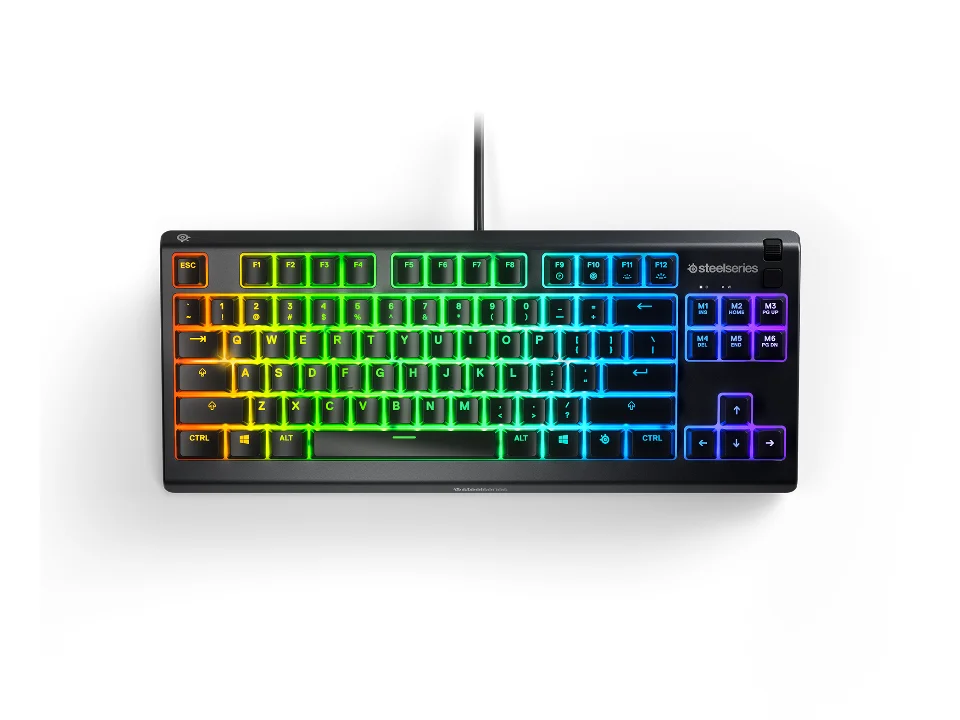
Is the Apex 3 TKL right for you?
The Apex 3 TKL is a tenkeyless membrane keyboard that connects by cable.
Best for
- People who want more room for a mouse. SteelSeries lists a Tenkeyless (TKL) layout, and a tenkeyless board leaves the number pad off the right-hand side.
Skip if
- You want mechanical switches. SteelSeries lists the switch technology as membrane.
- You want each key lit on its own. SteelSeries describes the lighting as 8-Zone RGB Illumination, and zoned lighting colours a keyboard in areas rather than key by key.
How a tenkeyless board compares with full-size and compact ones is covered in our guide Full-size, TKL or compact: which keyboard size should you get?
Want to see it next to a mouse and a headset? Try it on the QuickDesker board and build a whole desk setup around it.
What does it cost, and what should you check first?
- Seen at SteelSeries.com for $49.99 (Black) on 31 Oct 2026
- Seen at Best Buy for $79.00 (Black) on 16 Sep 2026
Prices change; check the one for the colour you want. SteelSeries sells it in Black, White, Aqua, Lavender and Amethyst.
Measure your desk before you order. SteelSeries gives the width as 364 mm, the depth as 150 mm and the height as 40 mm, and lists the weight as 639 g.
SteelSeries says it's certified IP32 water and dust resistant. In an IP code the second digit is for water, and a 2 means protection against dripping water with the device tilted up to 15 degrees.
In the box, SteelSeries lists the Apex 3 TKL Gaming Keyboard and a Product Information Guide.
SteelSeries also says it has "dedicated multimedia controls for easily adjusting volume and media".
How do the Apex 3 TKL's membrane switches work?
SteelSeries lists the switch technology as membrane and names the switches SteelSeries Whisper-Quiet Switches. On a membrane keyboard, pressing a key pushes a rubber dome down onto a layered circuit sheet, and the press registers when the layers touch. SteelSeries says the switches "last for over 20 million keypresses", and that it uses a "highly durable POM rubber dome sheet".
It also lists N-key rollover as 24 Keys and calls its anti-ghosting Gaming Grade. Rollover is how many keys held down at the same time a keyboard can register.
What separates a membrane keyboard from a mechanical one is covered in our guide Mechanical vs. membrane keyboards: which should you actually buy?
What can you plug the Apex 3 TKL into?
SteelSeries lists the connection as Wired, and its compatibility list reads Windows, Mac OS X, Chromebook (ChromeOS), Xbox and PlayStation, with a USB port required. A wired keyboard takes its power through the cable, so there's no battery to keep charged.
Full specifications
| Layout | Tenkeyless (TKL) |
|---|---|
| Connections | Wired |
| Dimensions | 40 mm / 1.57 in (height); 364 mm / 14.3 in (width); 150 mm / 5.9 in (depth) |
| OS compatibility | Windows, Mac OS X, Chromebook (ChromeOS), Xbox, and PlayStation. USB port required |
| Switch technology | membrane |
| Backlight | 8-Zone RGB Illumination |
| Case material | Polymer Frame (top material) |
| Weight | 639 g / 1.41 lbs |
| Spill resistance claimed | certified IP32 water and dust resistant |
| N-key rollover | 24 Keys |
| In the box | Apex 3 TKL Gaming Keyboard; Product Information Guide |
SteelSeries' Apex 3 TKL product page doesn't list a key count, key travel or a polling rate.
Specifications from SteelSeries' Apex 3 TKL product page, read 16 Sep 2026.