Logitech Signature K650
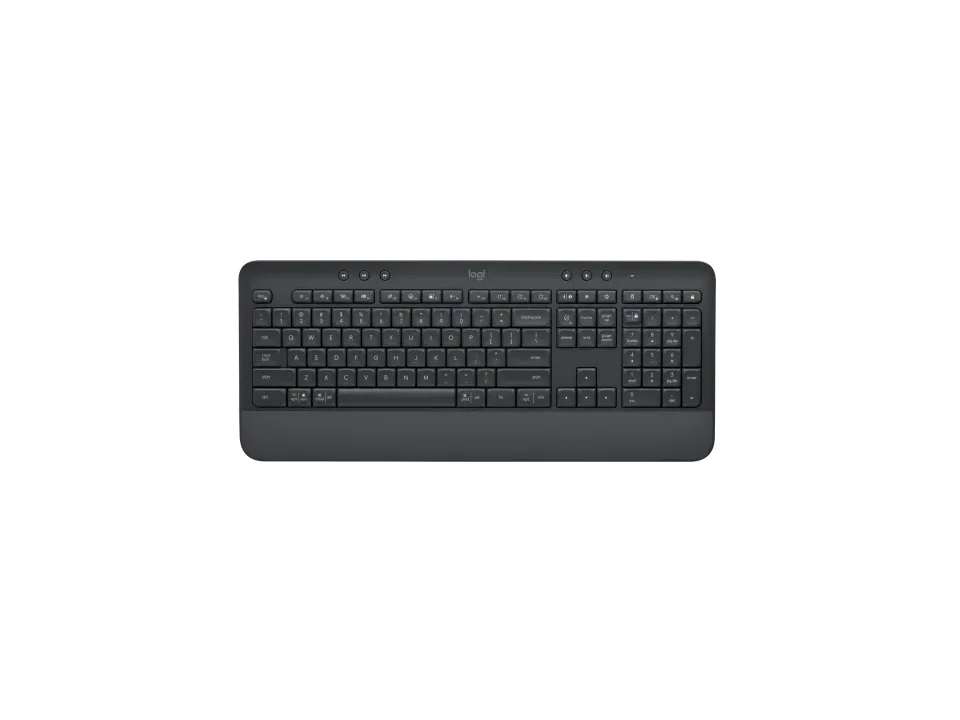
Is the Signature K650 right for you?
The Signature K650 is a full-size membrane keyboard with a built-in palm rest, and it connects by a Logi Bolt USB receiver or Bluetooth Low Energy.
Best for
- Anyone who wants a long time between battery changes. Logitech quotes up to 36 months of battery life, and the batteries are user-replaceable.
Skip if
- You move between several computers or tablets. Logitech says it's intended to be paired with one device at a time.
- You type in a dim room and want lit keys. Logitech's support specifications answer No for backlighting.
A full-size layout is the widest of the usual keyboard sizes; how the sizes compare is covered in our guide Full-size, TKL or compact: which keyboard size should you get?
Want to see it next to a mouse and a headset? Try it on the QuickDesker board and build a whole desk setup around it.
What does it cost, and what should you check first?
- Seen at Logitech.com for $49.99 (Graphite) on 7 Nov 2026
- Seen at Best Buy for $54.51 (Graphite) on 7 Nov 2026
Prices change; check the one for the colour you want. Logitech sells it in Off-white and Graphite.
The Logi Bolt USB receiver comes in the box, with the batteries already installed.
Check the battery size before you buy spares. Logitech's support specifications list 2 x AA batteries, and the box list on its product page says 2 AA. One of the FAQ answers on that same page says 2 standard AAA alkaline batteries.
Logitech's support specifications list Windows, macOS, Linux, Chrome OS, iPadOS, iOS and Android, with the minimum versions in the table below.
Logitech calls the design spill-resistant and says it's engineered to survive accidental liquid spills of up to 60ml. It gives a one-year limited hardware warranty.
How do the rubber-dome keys compare with mechanical ones?
Logitech says the K650 uses a deep-cushioned membrane rubber-dome switch system, and its support specifications give 3.2 mm of total key travel. On a rubber-dome keyboard, each key presses a dome onto a contact underneath, where a mechanical keyboard gives every key its own switch. A full-height mechanical switch typically travels about 4 mm, so each press here is a little shorter.
How the two key types trade off on repairs, price and size is covered in our guide Mechanical vs. membrane keyboards: which should you actually buy?
How long do the batteries last, and how many devices does it pair with?
Logitech quotes up to 36 months of battery life, and its support specifications say the batteries are user-replaceable, so a couple of spares in a drawer covers the day they run out.
It connects by the Logi Bolt USB receiver or by Bluetooth Low Energy, which Logitech's product page lists as Bluetooth 5.1. Logitech's support specifications give a wireless range of 10 m.
Logitech says it's intended to be paired with one device at a time. Reviews flagged that too: one counted the lack of Bluetooth multi-device pairing against it; another noted it pairs with only one device.
Full specifications
| Layout | Full-size keyboard |
|---|---|
| Connections | Bluetooth® Low Energy, Logi Bolt Receiver |
| Battery | 2 x AA batteries (support specifications) · 2 standard AAA alkaline batteries (product page FAQ) |
| Battery life, as quoted | 36 months |
| OS compatibility | Windows 10, Windows® 11 or later, macOS 10.15 or later, Linux, Chrome OS, iPadOS 14 or later, iOS 14 or later, Android 8.0 or later |
| Switch technology | Membrane rubber-dome switch system |
| Backlight | No |
| Weight | 24.7 oz (700.23 g) |
| Remapping software | Logitech Options+ |
| Wrist rest included | The palm rest is completely built-in |
| Spill resistance claimed | Spill-resistant |
| Key travel | 3.2 mm |
| Devices paired at once | It is intended to be paired with one device at a time |
| Warranty | 1 year limited hardware warranty |
| In the box | Signature K650 Wireless Comfort Keyboard, 2 AA batteries (pre-installed), Logi Bolt USB Receiver, User documentation |
Logitech's Signature K650 product page and support specifications don't list a key count, an actuation force or a polling rate.
Specifications from Logitech's Signature K650 product page, support specifications and support warranty page, read 7 Nov 2026.