Logitech MX Ergo S
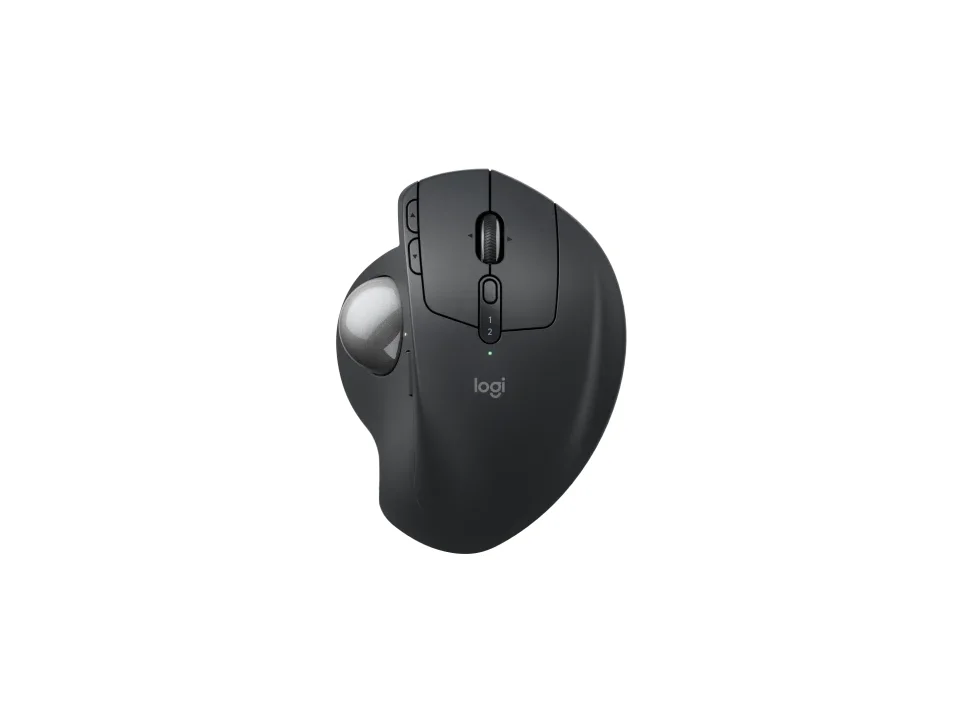
Is the MX Ergo S right for you?
The MX Ergo S is a wireless trackball that connects by Logi Bolt receiver or Bluetooth and charges over USB-C.
Best for
- People who'd rather roll a ball than push a mouse around; Logitech gives this one a 20-degree tilt angle.
- Anyone moving between two computers, since it pairs with two at once.
Skip if
- You want backlighting. Logitech's specifications list it as No.
- You want a charging cable in the box; Logitech's box list leaves it out.
A trackball stays put while you roll the ball, where a vertical mouse still slides across the desk; see Vertical mouse vs. trackball: which ergonomic mouse is right for you?
Want to see it next to a keyboard and a headset? Try it on the QuickDesker board and build a whole desk setup around it.
What does it cost, and what should you check first?
- Seen at Best Buy for $99.99 (MX Ergo S Plus - with extra wedge) on 23 Oct 2026
- Seen at Logitech.com for $99.99 (MX Ergo S) on 23 Oct 2026
Prices change, so check the current one before you buy. Logitech sells it in Graphite, as the MX Ergo S and as the MX Ergo S Plus, which comes with an extra 10-degree wedge.
Check you have a free USB-A port for the Logi Bolt receiver, which comes in the box. A USB-A plug doesn't fit a USB-C port without an adapter. Logitech's requirements for the receiver also name Windows 10, 11 or later, macOS 12 or later, Linux and ChromeOS. It charges through a USB-C port. Logitech quotes up to 120 days on a full charge, and 24 hours of use from a one-minute charge. The warranty is a one-year limited hardware warranty.
What does the 20-degree tilt do?
Logitech gives the MX Ergo S a 20-degree tilt angle. Tilting a mouse turns your hand partly onto its side, instead of flat and palm-down. Logitech says the angle means less muscle strain in your forearm.
Logitech says you track with your thumb while your hand stays supported on the sculpted ergonomic design with a soft rubber grip, and calls it a good fit for medium to large-sized hands.
What do the buttons do, and how quiet are the clicks?
There are eight buttons, including back and forward, a scroll wheel that tilts left and right, a Precision Mode button and an Easy-Switch button. Six of them are customizable, and Logitech lists Logi Options+ on Windows and macOS as the supporting software at release.
Logitech also says the left click is 80% quieter than the MX Ergo's, measured in its own lab at 1 m. It rates the left and right buttons for 3 million clicks. If quiet matters most, see Which Mice Have Silent Clicks, and What Do They Cover?
Full specifications
| Buttons | 8 (Left/Right-click, Back/Forward, Scroll-wheel with Right/Left-tilt and Middle-click, Precision Mode, Easy-Switch) |
|---|---|
| Programmable controls | 6 |
| Vertical angle | 20-degree tilt angle |
| Sensor | Logitech Advanced Optical Tracking |
| Minimum DPI | 100 (SW) (Logitech support specifications) · 512 (Logitech support specifications, second DPI entry) · 512 (Logitech product page) |
| Maximum DPI | 2000 (SW), 4000 (FW) (Logitech support specifications) · 2048 (Logitech support specifications, second DPI entry) · 2048 (Logitech product page) |
| Polling rate | 125 Hz (8 ms) (Wireless, HI Mode) |
| Connections | Bluetooth Low Energy Technology, Logi Bolt USB Receiver |
| Power | Rechargeable with USB-C charging |
| Battery life, as quoted | Up to 120 days on a single full charge; 1-min charge for 24-hour of use |
| Weight | 5.78 oz (164 g) (without metal plate/without receiver) |
| Switch rating | Left/Right button: 3M cycles |
| Silent clicks claimed | 80% quieter clicks compared to MX Ergo (left click DBA measured by the Logitech internal lab at 1m) |
| Tilt scrolling | Scroll-wheel with Right/Left-tilt |
| Lighting | No |
| Remapping software | Supported by Logi Options+ on Windows and macOS (at release) |
| Dimensions | 5.22 in (132.5 mm); 3.93 in (99.8 mm); 2.02 in (51.4 mm) |
| Maximum tracking speed | > 20 IPS |
| Maximum acceleration | > 10 G |
| Receiver | Logi Bolt USB receiver: Type A |
| Charging port | USB Type-C port |
| Devices paired at once | two devices at the same time |
| Warranty | 1-Year Limited Hardware Warranty |
| In the box | MX Ergo S: MX Ergo S Advanced Wireless Trackball, Logi Bolt Receiver, Document (Cable not included). MX Ergo S Plus: MX Ergo S Plus Advanced Wireless Trackball, Detachable Wedge, Logi Bolt Receiver, Document (Cable not included). |
Logitech's MX Ergo S support specifications and product page don't list a free-spin scroll wheel or onboard profiles.
Specifications from Logitech's MX Ergo S support specifications, product page and support FAQ, read 8 Sep 2026.