Logitech MK270 Combo
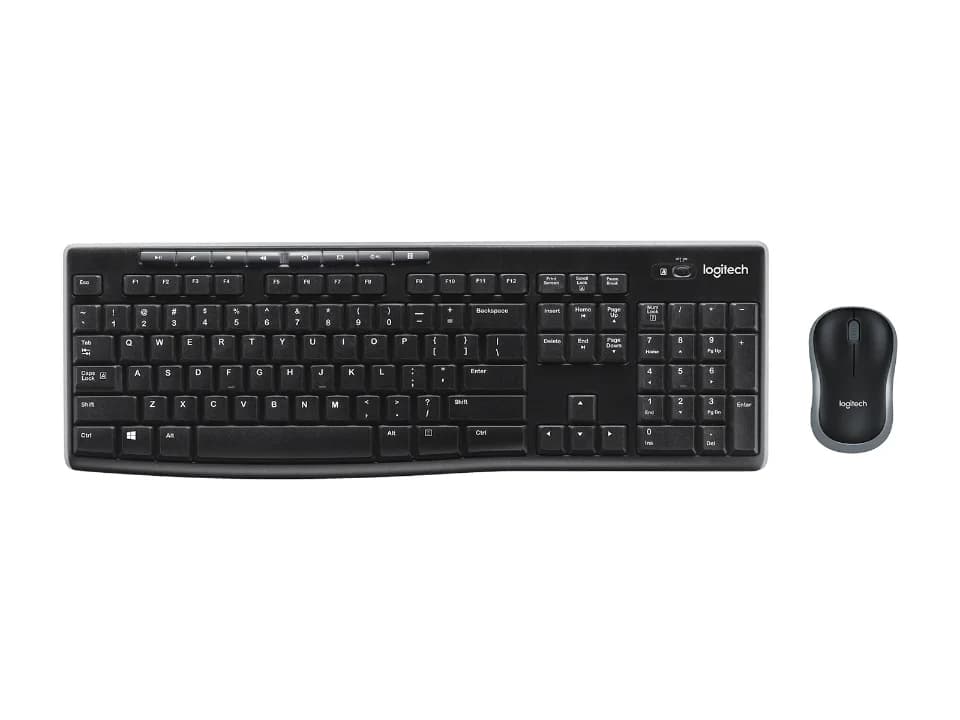
Is the MK270 Combo right for you?
The MK270 Combo is a full-size wireless keyboard and mouse set that connects over 2.4GHz through a USB receiver.
Best for
- People who enter a lot of numbers. Logitech lists a 10-Key Number pad.
- Left-handed people who want the mouse too. Logitech says the mouse is designed to be equally comfortable for both left- and right-handed users.
Skip if
- You'd rather recharge than swap batteries. The keyboard runs on 2 AAA alkaline batteries.
- You want more than three buttons on the mouse. Logitech lists 3: left-click, right-click and middle click.
A number pad adds width to a keyboard; which size suits your desk is covered in our guide Full-size, TKL or compact: which keyboard size should you get?
Want to see it next to a mouse and a headset? Try it on the QuickDesker board and build a whole desk setup around it.
What does it cost, and what should you check first?
- Seen at Best Buy for $19.99 (Black) on 22 Oct 2026
- Seen at Logitech.com for $19.99 (Black) on 22 Oct 2026
Prices change; check the one for the colour you want. Logitech sells it in Black, Off-White and Rose.
Logitech's box lists don't all match. Its product page lists the keyboard with 2 AAA batteries, the mouse with 1 AA battery, a USB receiver and user documentation. Its data sheet lists 2 AA batteries for the mouse and adds a USB range extender. The quick start guide names the pair as a Logitech K270 Keyboard and a Logitech M185 Mouse.
Logitech's product page says you need an available USB port, and lists ChromeOS and Windows 10, 11 or later. Its other pages give different system lists, all in the table below.
The warranty is Logitech's 3-year limited hardware warranty.
Is the keyboard spill-resistant, and what else is on it?
Logitech's product page lists a spill-resistant design, adjustable keyboard height and a caps lock indicator light, and gives the key type as deep profile.
How long do the batteries last, and how does it connect?
Logitech's figures for the keyboard batteries don't all agree. Its product page says 36 months, and its MK270 battery support article says expected battery life is up to 24 months.
The product page gives a wireless range of 33 ft (10 m), and Logitech says the receiver is so tiny it can stay in your computer.
Full specifications
| Layout | Full-size |
|---|---|
| Connections | 2.4GHz |
| Battery | 2 x AAA (Alkaline), removable/replaceable |
| Battery life, as quoted | Up to 36 months (not rechargeable) (Logitech support specifications, Keyboard Y-R0042 with Mouse MR0085) · Up to 24 months (not rechargeable) (Logitech support specifications, Keyboard Y-R0042 with Mouse M-R0061; Keyboard Y-R0015 with Mouse M-R0038) · 36 months (Logitech product page) · Expected battery life is up to 24 months (MK270 battery support article) |
| Dimensions | Height: 5.87 in (149 mm); Width: 17.36 in (441 mm); Depth: 0.71 in (18 mm) (Logitech product page) · Width: 17.6 in (441.5 mm); Height: 0.9 in (22.9 mm); Depth: 5.9 in (149.1 mm) (MK270 data sheet) · Height x Width x Depth: 22.75mm x 441.53mm x 149mm (MK270 quick start guide) |
| OS compatibility | Windows 7, Windows 8, Windows 10 or later; Mac OS 10.10.x or later; Chrome OS; Linux Kernel 2.6 (at release) (Logitech support specifications, Keyboard Y-R0042 with Mouse MR0085; Keyboard Y-R0042 with Mouse M-R0061) · Windows 7; Windows XP; Windows Vista; Windows® 10 or later; Windows® 8; Windows® 7 Chrome OSTM (at release) (Logitech support specifications, Keyboard Y-R0015 with Mouse M-R0038) · ChromeOS; Windows® 10, 11 or later (Logitech product page) · Windows® XP, Windows Vista®, Windows® 7, Windows® 8 (MK270 data sheet) · Windows® 10 or later, Windows® 8, Windows® 7, Windows Vista®, Windows® XP; Chrome OS™ (MK270 quick start guide) |
| Number pad | 10-Key Number pad |
| Weight | 17.57 oz (498 g) (Logitech product page) · 17.2 ounces (487.6 g) (MK270 data sheet) · 495g (With Battery) (MK270 quick start guide) |
| Spill resistance claimed | Spill-resistant design |
| Keycap profile | Deep profile |
| Receiver | Logitech non-Unifying USB Nano receiver (2.4GHz) (Logitech support specifications, Keyboard Y-R0042 with Mouse MR0085; Keyboard Y-R0042 with Mouse M-R0061) · Logitech Unifying USB receiver (Logitech support specifications, Keyboard Y-R0015 with Mouse M-R0038) |
| Warranty | 3-year limited hardware warranty |
| In the box | Keyboard with 2 AAA batteries, Mouse with 1 AA battery, USB receiver, User documentation (Logitech product page) · Keyboard, Mouse, USB receiver, USB range extender, 2 AAA (keyboard) and 2 AA (mouse) batteries, User documentation (MK270 data sheet) · Logitech K270 Keyboard, Logitech M185 Mouse, AAA Battery x 2, AA Battery x 1, USB Nano receiver, User documentation (MK270 quick start guide) |
Logitech's MK270 product page and support specifications don't list a key count, a switch type, a polling rate or an included wrist rest.
Specifications from Logitech's MK270 product page, support specifications, MK270 battery support article, MK270 data sheet and MK270 quick start guide, read 26 Sep 2026.