HyperX Cloud III
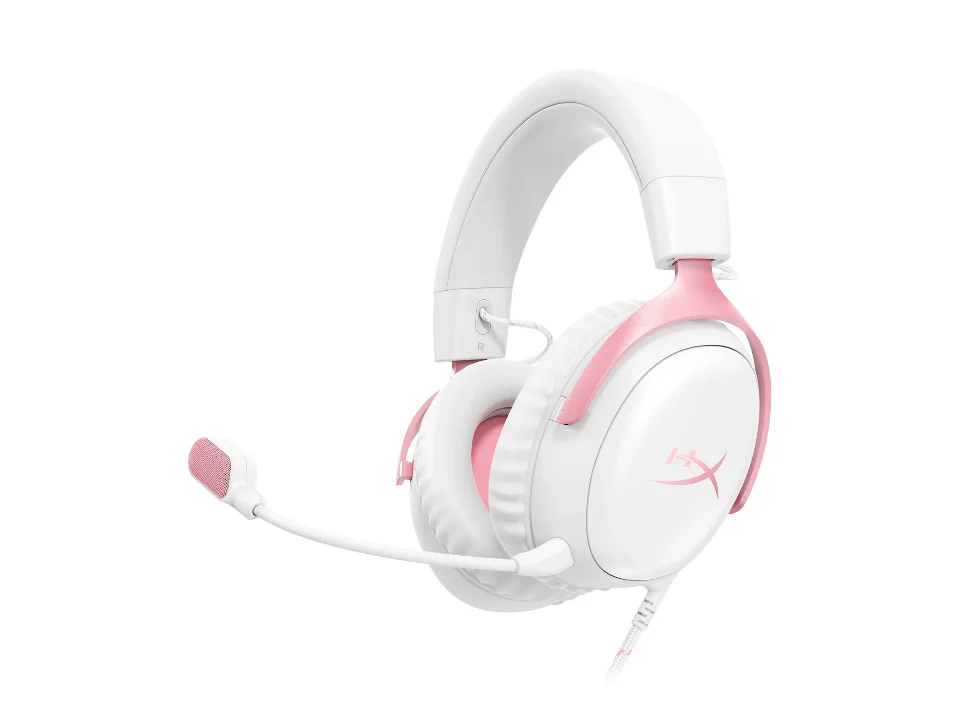
Is the Cloud III right for you?
The Cloud III is HyperX's closed-back, over-ear gaming headset. It connects by cable, and HyperX says 3.5mm, USB-A and USB-C connectors are included.
Best for
- Moving one headset between a computer and a console. HyperX lists it as compatible with PC, PS5, PS4, Xbox Series X|S, Xbox One, Nintendo Switch, Mac and mobile devices.
- Voice chat with a mic you can take off. HyperX's box list includes a detachable microphone, which HyperX describes as noise-cancelling, with an LED that shows when you're muted.
Skip if
- You want noise cancelling for your own ears. HyperX's Cloud III product page doesn't list active noise cancelling.
A noise-cancelling mic and noise-cancelling headphones do different jobs, and our guide sorts one from the other: What “noise cancelling” actually means on a headphone box.
Want to see it next to a keyboard and a mouse? Try it on the QuickDesker board and build a whole desk setup around it.
What does it cost, and what should you check first?
- Seen at HyperX.com for $57.99 (Black-Red) on 13 Oct 2026
- Seen at Best Buy for $69.99 (Black) on 13 Oct 2026
Prices change; check the one for the colour you want. HyperX's product page lists it in Black, Black-Blue, Black-Lavender, Black-Red, White, White-Blue and White-Pink.
HyperX's box list is the headset, the detachable microphone, a USB dongle, a USB-C to USB-A adapter and a quick start guide. It lists the headset cable at 3.93ft and the USB dongle cable at 4.26ft.
HyperX says controls on the earcup give you quick access to mute your mic or adjust the volume. Its product page lists a warranty of 2 years.
What's the difference between plugging the Cloud III in by USB and by 3.5mm?
One difference is where the sound is converted from digital data into the electrical signal the drivers play. Through a 3.5mm jack, the device you plug into does that conversion before the sound leaves the port. Over USB, the sound leaves as data, and hardware on the headset's side of the plug does the converting.
HyperX lists the USB dongle cable as Type-C, and the adapter in the box puts a USB-A plug on the end for a port that needs one. How each connection splits that work between the device and the headset is covered in our guide Wired vs wireless headphones: where the sound is actually made.
Full specifications
| How it is worn | Over ear, circumaural |
|---|---|
| Connections | 3.5mm, USB-A, and USB-C connectors |
| Active noise cancelling | Not listed on HyperX's Cloud III product page |
| Weight | 0.67lb; Weight with microphone: 0.70lb |
| Back design | closed back |
| Microphone noise reduction | Noise-cancelling |
| Driver diameter | 53mm |
| Driver type | Dynamic |
| Frequency response | 10Hz-21kHz |
| Microphone | Detachable Microphone |
| Cable length | 3.93ft headset cable; 4.26ft USB dongle cable |
| Sensitivity | 100dBSPL/mW at 1kHz |
| Warranty | 2 years |
| In the box | Gaming Headset, Detachable Microphone, USB Dongle, USB-C to USB-A Adapter, Quick Start Guide |
HyperX's Cloud III product page doesn't list water resistance or dimensions.
Specifications from HyperX's Cloud III product page, read 17 Sep 2026.